Advanced Deployment Strategies Using ApplicationSets and Application of Applications in ArgoCD

https://www.opsmx.com/wp-content/uploads/2022/07/Argo-1-e1630327305635-1.png
This article is part of a series that explores various facets of using ArgoCD in a GitOps context to manage Kubernetes deployments. From fundamental principles to advanced strategies, this series aims to provide a comprehensive understanding and practical guidance on leveraging ArgoCD effectively.
Table of Contents
- Introduction to GitOps with ArgoCD: Foundations and Architecture
- Utilizing Kustomize with ArgoCD for Application Deployment
- Advanced Deployment Strategies Using ApplicationSets and Application of Applications in ArgoCD
- Unlocking Advanced Image Management with ArgoCD and ArgoCD Image Updater
- Integrating Google Login with Argo CD: Step-by-Step Setup Tutorial
Introduction
As we delve deeper into using ArgoCD for GitOps, manually managing a growing number of applications can become overwhelming. In this chapter, we will explore two advanced strategies: ApplicationSets and Application of Applications. These methods will help us handle multiple deployments across different environments and organize complex setups more efficiently. By adopting these strategies, we will reduce the manual workload and enhance deployment efficiency.
Understanding the ArgoCD Application
Before diving into advanced deployment strategies like ApplicationSets and the Application of Applications, it’s crucial to grasp the fundamental concept of an “Application” in ArgoCD. An ArgoCD Application is a Kubernetes custom resource definition (CRD) that encapsulates everything from the source repository to deployment specifics and sync policies. This understanding is essential as it lays the foundation for deploying and managing applications with ArgoCD.
What is an ArgoCD Application?
An ArgoCD Application is not just a set of Kubernetes resources but a defined CRD within Kubernetes itself. This resource includes the source repository, path within the repository, destination cluster, namespace, and synchronization policy.
Example of an ArgoCD Application YAML:
apiVersion: argoproj.io/v1alpha1
kind: Application
metadata:
  name: example-app
  namespace: argocd
spec:
  project: default
  source:
    repoURL: https://github.com/example/repo.git
    targetRevision: HEAD
    path: path/to/manifests
  destination:
    server: https://kubernetes.default.svc
    namespace: example-namespace
  syncPolicy:
    automated:
      selfHeal: true
      prune: true
See application.yaml for additional fields. You can apply this with
kubectl apply -n argocd -f application.yamland Argo CD will start deploying the example-app application.
Introduction to ApplicationSets

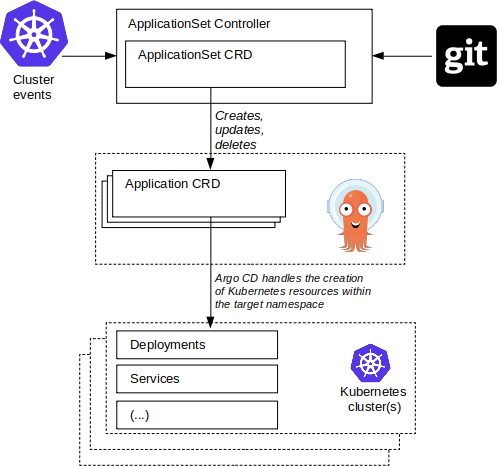
ApplicationSets are a pivotal feature within ArgoCD, designed to manage multiple applications across different environments or clusters. This tool extends ArgoCD’s capabilities, allowing for dynamic configuration and deployment of applications based on defined templates.
How ApplicationSets Work
- Template Driven: ApplicationSets use a template to define the base configuration for applications, which is then combined with parameters from a generator to create multiple ArgoCD applications.
- Generators:Several types of generators can dynamically source parameters like cluster specifics, Git repositories, or list items, enabling widespread deployment scenarios.
Example Use Case
ObjectiveThe goal is to deploy a specific application configuration to multiple Kubernetes clusters. The application configuration will vary slightly depending on the cluster, allowing for customized deployments (e.g., different configurations for development vs. production environments).
Folder Structure
First, let’s define the folder structure in the Git repository that will store the Kubernetes manifests and the ApplicationSet definitions:
/myapp
├── bases
│   ├── app
│   │   ├── deployment.yaml
│   │   └── service.yaml
└── overlays
    ├── dev
    │   ├── kustomization.yaml
    │   └── patch.yaml
    └── prod
        ├── kustomization.yaml
        └── patch.yaml
In this structure:
- Bases: Contains the base Kubernetes manifests for the application.
- Overlays: Contains environment-specific configurations using Kustomize. Each environment (e.g.,
dev,prod) has its own directory with akustomization.yamland patches to modify the base manifests.
ApplicationSet Definition
The ApplicationSet resource will use a Git generator to fetch different overlays for different clusters and a cluster generator to specify which clusters should receive which configuration.
apiVersion: argoproj.io/v1alpha1
kind: ApplicationSet
metadata:
  name: multi-cluster-app-set
spec:
  generators:
    - matrix:
        generators:
          - git:
              repoURL: https://github.com/yourorganization/yourrepo.git
              revision: HEAD
              directories:
                - path: myapp/overlays/*
          - clusters:
              selector:
                matchLabels:
                  argocd.argoproj.io/secret-type: cluster
                  kubernetes.io/environment: '{{.path.basename}}'
  template: # used to generate Argo CD Application resources
    metadata:
      name: 'myapp-{{path.basename}}' # myapp-dev, myapp-prod
    spec:
      project: default
      source:
        repoURL: https://github.com/yourorganization/yourrepo.git
        targetRevision: HEAD
        path: '{{.path.path}}' # myapp/overlays/dev, myapp/overlays/prod
      destination:
        server: '{{.server}}' # https://dev.cluster.server, https://prod.cluster.server
        namespace: default
      syncPolicy:
        automated:
          selfHeal: true
          prune: true
In this ApplicationSet:
- Matrix Generator: Combines two generators (Git and clusters) to deploy applications based on both the environment in the cluster and the overlays defined in Git.
- Git Generator: Points to different directories under
overlays, each corresponding to a specific environment likedevorprod. - Cluster Generator: Specifies clusters based on labels. Each cluster should have a label that matches one of the environments.
How It Works
Git Directory Generator:
- Scans the specified Git repository
[https://github.com/yourorganization/yourrepo.git](https://github.com/yourorganization/yourrepo.git.) - Discovers directories under
myapp/overlays/*, each representing an overlay for a different environment (e.g.,dev,prod). - Produces sets of parameters for each discovered overlay
Example Outputs:
- path: myapp/overlays/dev
  path.basename: dev
- path: myapp/overlays/prod
  path.basename: prod
Cluster Generator:
- Scans the set of clusters defined in ArgoCD, looking for secrets that match the labels specified (
argocd.argoproj.io/secret-type: clusterand dynamically usingkubernetes.io/environment: '{{.path.basename}}'). - Produces sets of parameters for each cluster that matches the environment derived from the
path.basename(which binds the overlays to specific cluster environments):
Example Outputs:
- name: dev-cluster
  server: https://dev.cluster.server

- name: prod-cluster
  server: https://prod.cluster.server
Matrix Generator:
- Combines the outputs from both the Git and cluster generators.
- Produces final sets of parameters for application instances that ArgoCD will manage, ensuring each environment-specific overlay is deployed to its corresponding cluster:
Example Combinations:
- name: myapp-dev
  server: https://dev.cluster.server
  path: myapp/overlays/dev
  path.basename: dev

- name: myapp-prod
  server: https://prod.cluster.server
  path: myapp/overlays/prod
  path.basename: prod
After you apply this ApplicationSet with
kubectl -*n argocd -f applicationset.yaml*, ArgoCD will begin monitoring the specified Git repository as detailed above. ArgoCD actively scans for changes in the repository, particularly looking at the defined directories undermyapp/overlays/*for environment-specific configurations. As it detects changes or confirms the initial setup, it will automatically create Application CRDs for each environment as defined in the template section of the ApplicationSet.
Introduction to Application of Applications

https://argo-cd.readthedocs.io/en/stable/assets/application-of-applications.png
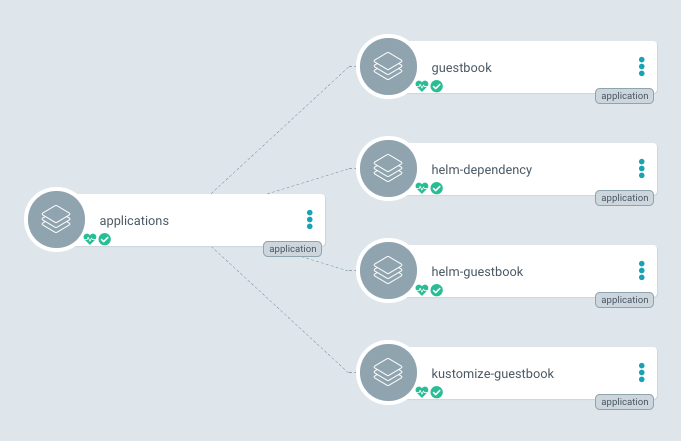
The “ Application of Applications” pattern in ArgoCD is a powerful meta-application strategy where a single ArgoCD application (often referred to as the “master” or “root” application) manages the lifecycle of multiple other applications. This method is particularly useful for deploying and maintaining a suite of related applications as part of a larger system, like a full application stack that spans multiple services.
How Application of Applications Works
The Application of Applications pattern relies on the master application pointing to a directory in a Git repository that contains the definitions of other applications. This structure allows the master application to cascade updates, configurations, and policies to the child applications, ensuring consistent deployments across environments.
Example
Folder Structure
To implement the Application of Applications pattern, organize your Git repository as follows:
/repo-root
├── apps           # Directory containing Application definitions for each microservice
│   ├── app1.yaml  # ArgoCD Application YAML for microservice 1
│   ├── app2.yaml  # ArgoCD Application YAML for microservice 2
│   └── app3.yaml  # ArgoCD Application YAML for microservice 3
├── myapp1         # Helm charts or other Kubernetes manifests used by child apps
│   ├── charts
│   └── values.yaml
└── ...
Root App Definition
This YAML file configures the root application which points to the directory containing the child application definitions.
apiVersion: argoproj.io/v1alpha1
kind: Application
metadata:
  name: root-app
  namespace: argocd
  finalizers:
  - resources-finalizer.argocd.argoproj.io
spec:
  project: default
  source:
    repoURL: https://github.com/yourorganization/yourrepo.git
    path: apps
    targetRevision: HEAD
  destination:
    server: https://kubernetes.default.svc
    namespace: default
  syncPolicy:
    automated:
      selfHeal: true
      prune: true
This configuration directs ArgoCD to monitor the apps directory in the specified repository for Application definitions, which represent each microservice.
Sample Child App Definition
Below is an example of a child application that might be found within the apps directory. Each child app definition points to its specific configuration, such as a Helm chart or Kubernetes manifest.
apiVersion: argoproj.io/v1alpha1
kind: Application
metadata:
  name: myapp1
  namespace: argocd
  finalizers:
  - resources-finalizer.argocd.argoproj.io
spec:
  project: default
  source:
    repoURL: https://github.com/yourorganization/yourrepo.git
    path: myapp1
    targetRevision: HEAD
  destination:
    server: https://dev.cluster.server
    namespace: default
  syncPolicy:
    automated:
      selfHeal: true
      prune: true
In this example, myapp1 is configured to deploy from the *myapp1* directory, which contains the necessary Helm chart for deployment. The destination specifies a development cluster, differentiating it from the in-cluster deployment of the root app.
After you apply this Root Application with
*kubectl -n argocd -f rootapp.yaml*, ArgoCD starts monitoring the specified Git repository path (apps/directory), where it detects and manages each Child Application based on the YAML definitions stored there. ArgoCD automatically deploys and synchronizes each child application according to its configuration, maintaining the desired state across various environments and clusters. This process allows for a centralized yet flexible management approach, where updates, additions, or deletions in the Git repository are automatically reflected in the corresponding clusters, ensuring operational consistency and scalability.
Conclusion
In conclusion, ArgoCD’s ApplicationSets and the Application of Applications pattern provide robust frameworks for managing complex Kubernetes deployments. ApplicationSets facilitate dynamic, automated deployments across multiple clusters, while the Application of Applications pattern enables hierarchical management of interconnected services. Both strategies significantly enhance automation, consistency, and scalability in Kubernetes environments, empowering teams to manage sophisticated infrastructures effectively. By leveraging these tools, organizations can streamline their operations and adapt more readily to evolving application demands.
Support My Work ☕

If you enjoy my work, consider buying me a coffee! Your support helps me keep creating valuable content and sharing knowledge. ☕
More from Kittipat.Po
Recommended from Medium
[
See more recommendations
](https://medium.com/?source=post_page---read_next_recirc--e01774e10561---------------------------------------)