Understanding CPU Context Switching in Linux System

Linux is a multitasking operating system that supports far more tasks running simultaneously than the number of CPUs available. However, these tasks are not actually running at the same time; rather, the system switches the CPU between them very quickly, creating the illusion of multitasking.
Before each task runs, the CPU needs to know where the task is loaded from and where it should start running. This means that the system must set up the CPU registers and the Program Counter (PC) for it in advance.
CPU registers are small, fast memory units built into the CPU. The Program Counter is used to store the current instruction being executed by the CPU or the address of the next instruction to be executed. These are essential dependencies for the CPU to run any task and are therefore referred to as the CPU context.

Image by Author
Understanding what CPU context is, it’s easy to understand CPU context switching. CPU context switching involves saving the CPU context (CPU registers and Program Counter) of the previous task, loading the context of the new task into these registers and the Program Counter, and then jumping to the new location indicated by the Program Counter to run the new task.
The saved contexts are stored in the system kernel and are loaded back when the task is rescheduled to ensure that the task’s original state is not affected, making the task appear to run continuously.
Some might argue that CPU context switching simply updates the values of CPU registers, which are designed for fast task execution. Why does this affect the CPU performance of the system?
Before answering this question, have you ever thought about what tasks the operating system manages?
You might say, tasks are processes or threads. Yes, processes and threads are indeed the most common tasks. But are there any other tasks?
Don’t forget, hardware triggers signals that lead to the invocation of interrupt handlers, which is also a common task.
Therefore, depending on the type of task, CPU context switching can be divided into several different scenarios: process context switching, thread context switching, and interrupt context switching.
In this article, I’ll take you through how to understand these different context switch scenarios and why they can lead to CPU performance issues.
Process context switching
Linux divides the process’s address space into kernel space and user space according to privilege levels, corresponding to the CPU privilege levels of Ring 0 and Ring 3 as shown in the diagram below.
- Kernel space (Ring 0) has the highest privilege and can directly access all resources.
- User space (Ring 3) can only access limited resources and cannot directly access memory and other hardware devices. It must trap into the kernel through a system call to access these privileged resources.

Image by Author
Looking at it from another perspective, a process can run in both user space and kernel space. When a process is running in user space, it is referred to as user mode, and when it transitions into the kernel space, it is referred to as kernel mode.
The transition from user mode to kernel mode is accomplished through a system call. For example, when we view the contents of a file, multiple system calls are needed to complete the operation: first, the open() system call is used to open the file, then the read() system call is used to read the file contents, followed by the write() system call to write the contents to standard output, and finally the close() system call is used to close the file.
Does a CPU context switch occur during a system call? The answer is yes.
The original position of the user mode instruction in the CPU registers needs to be saved. Then, to execute kernel mode code, the CPU registers need to be updated to the new position of the kernel mode instruction. Finally, the CPU jumps to run the kernel task in kernel mode.
After the system call ends, the CPU registers need to restore the saved user mode context, and then switch back to user space to continue running the process. Therefore, during a system call, there are actually two CPU context switches.
However, it’s important to note that during a system call, there is no involvement of process resources in user mode such as virtual memory, nor is there a process switch. This is different from what we usually refer to as a process context switch:
- A process context switch refers to switching from one process to another for execution.
- In contrast, during a system call, the same process continues to run.
Therefore, the process during a system call is usually referred to as a privilege mode switch, rather than a context switch. However, in reality, a CPU context switch is still unavoidable during a system call.
So, what’s the difference between a process context switch and a system call?
Firstly, you need to understand that processes are managed and scheduled by the kernel, and process switching can only occur in kernel mode. Therefore, the process context includes not only user space resources such as virtual memory, stack, and global variables, but also kernel space states like the kernel stack and registers.
As a result, a process context switch involves an additional step compared to a system call: before saving the current process’s kernel state and CPU registers, its virtual memory, stack, and other user space resources need to be saved. Similarly, after loading the kernel state of the next process, the virtual memory and user stack of that process need to be refreshed.
As shown in the diagram, saving and restoring context is not “free” and requires the kernel to run on the CPU to complete.
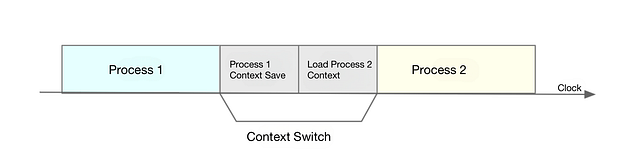
Image by Author
According to Tsuna’s test report, each context switch requires tens of nanoseconds to several microseconds of CPU time. This time is quite considerable, especially when there are many process context switches, which can easily cause the CPU to spend a lot of time saving and restoring resources such as registers, kernel stacks, and virtual memory, thereby significantly reducing the actual running time of processes. This is also an important factor leading to an increase in average load, as mentioned in the previous section.
Furthermore, we know that Linux manages the mapping relationship between virtual memory and physical memory through the Translation Lookaside Buffer (TLB). When virtual memory is updated, the TLB also needs to be flushed, which slows down memory access. Especially in multiprocessor systems, the cache is shared by multiple processors, so flushing the cache not only affects the processes of the current processor but also the processes of other processors that share the cache.
Knowing the potential performance issues of process context switches, let’s take a look at when process context switches occur.
Obviously, process context switches only occur when process scheduling is required. In other words, process context is switched only during process scheduling. Linux maintains a ready queue for each CPU, which sorts active processes (i.e., processes that are running or waiting for the CPU) by priority and the time they have been waiting for the CPU, and then selects the process that needs the CPU most, i.e., the process with the highest priority and the longest wait time for the CPU, to run.
So when will a process be scheduled to run on the CPU?
The most obvious time is when a process finishes execution and releases the CPU it was using, at which point a new process is taken from the ready queue to run. There are many other scenarios that also trigger process scheduling, which I will explain one by one here.
First, to ensure that all processes can be fairly scheduled, CPU time is divided into segments of time called time slices, which are then assigned to processes in turn. When the time slice of a process is exhausted, the process is suspended by the system and another waiting process is scheduled to run.
Second, when system resources are insufficient (such as insufficient memory), a process has to wait until the resources are available before it can run, at which point the process is also suspended, and the system schedules other processes to run.
Third, when a process voluntarily suspends itself using a sleep function, for example, it will also be rescheduled.
Fourth, when a higher-priority process is running, the current process is suspended to ensure that the higher-priority process can run.
Finally, when a hardware interrupt occurs, the process on the CPU is suspended, and an interrupt service routine in the kernel is executed.
It is very necessary to understand these scenarios, as they are the culprits behind context switch performance issues when they occur.
Thread context switch
The greatest difference between threads and processes is that a thread is the basic unit of scheduling, while a process is the basic unit of resource ownership. To put it simply, when we talk about task scheduling in the kernel, we are actually scheduling threads; processes merely provide resources such as virtual memory and global variables to threads. Therefore, we can understand threads and processes as follows:
When a process has only one thread, the process can be considered equivalent to the thread.
When a process has multiple threads, these threads share the same virtual memory and global variables. These resources do not need to be modified during context switches.
Additionally, threads have their own private data, such as stacks and registers, which need to be saved during context switches.
In this light, context switches for threads can be divided into two cases:
In the first case, the two threads belong to different processes. In this situation, because resources are not shared, the context switch process is similar to process context switches.
In the second case, the two threads belong to the same process. Here, since the virtual memory is shared, the switch only needs to change the thread’s private data, registers, and other non-shared data.
From this, you should also realize that although both are context switches, switching between threads within the same process consumes fewer resources than switching between multiple processes. This is one of the advantages of using multiple threads instead of multiple processes.
Interrupt context switching
In order to respond quickly to hardware events, interrupt handling interrupts the normal scheduling and execution of processes, and calls the interrupt handler to respond to device events. When interrupting other processes, the current state of the process needs to be saved so that the process can resume running from its original state after the interrupt ends.
Unlike process context switching, interrupt context switching does not involve the user space of a process. Therefore, even if an interrupt interrupts a process that is in user space, there is no need to save and restore the user space resources of the process, such as virtual memory and global variables. The interrupt context only includes the state necessary for the execution of the kernel-mode interrupt service routine, including CPU registers, kernel stack, hardware interrupt parameters, etc.
For the same CPU, interrupt handling has a higher priority than processes, so interrupt context switching does not occur simultaneously with process context switching. Similarly, because interrupts interrupt the normal scheduling and execution of processes, most interrupt handlers are short and concise to execute as quickly as possible.
Additionally, like process context switching, interrupt context switching also consumes CPU cycles. Excessive switching can consume a significant amount of CPU and even seriously degrade the overall performance of the system. Therefore, when you find that the number of interrupts is too high, you need to investigate whether it will cause serious performance issues for your system.
My interests are wide-ranging, covering topics such as frontend and backend development, DevOps, software architecture, a bit of economics and finance
More from ByteCook
Recommended from Medium
[
See more recommendations
](https://medium.com/?source=post_page---read_next_recirc--59392606d191---------------------------------------)