Understanding Canary Deployments in Kubernetes Part 2: Implementing CRDs, Controllers, and Testing

Welcome back to our series on automating canary deployments in Kubernetes! In the first part, we introduced Kubernetes operators and the Operator SDK. Now, we’re diving into the practical implementation, covering Custom Resource Definitions (CRDs), controller logic, RBAC configurations, and testing our operator.
You can find the complete source code here.
Implementing Custom Resource Definitions (CRDs)
We will start by defining a CRD for our canary deployment strategy. For our canary deployment operator, CRDs enable us to define a custom resource type — Canary —that represents a canary deployment configuration. This section will guide you through creating a Canary CRD, explaining its components and how it integrates with our operator to manage canary deployments effectively.
# custom API group that helps to avoid naming collisions with core K8s resources, and
# v1alpha1 indicates this is an alpha version i.e. early stages of development

apiVersion: apps.thefoosthebars.com/v1alpha1
kind: Canary # type of the custom resource
metadata:
  name: example-app-canary
  namespace: canary-k8s-operator-system
spec:
  deploymentName: example-app
  image: nginx:1.21.4
  replicas: 1

  percentage: 20
Once we've defined and applied our Canary CRD to our K8s cluster, it becomes a new resource type that our operator can watch and manage. Our operator's controller logic will monitor for changes to Canary resources. When a new Canary resource is created or an existing one is updated, our operator will trigger the logic to perform the canary deployment based on the specifications defined in the resource's spec.
Please take a moment to comprehend that this allows users of the operator to declaratively define how they want their canary deployments to behave, simply by creating or modifying Canary resources in their clusters. The operator takes care of the rest, ensuring that the actual state of the system matches the desired state specified in the Canary resources.
Writing the Controller Logic in Go
The heart of our K8s operator is the Controller. It continually monitors our Canary custom resources and manages the lifecycle of canary deployments based on the specifications defined within these resources. The controller logic is implemented in Go, leveraging client-go and controller-runtime libraries for interacting with the Kubernetes API.
Key Steps in Controller Logic
Implementing the controller involves several key functions, each responsible for a part of the reconciliation loop.
I will specifically go through the reconciliation logic in Reconcile method in detail in the later steps.
Understanding the code can initially seem daunting, but by breaking down its flow and logic, it becomes significantly more approachable.
If we focus on understanding how the code operates and the reasoning behind its structure, it'll be easier to grasp.
1. Watching for changes
First, our controller needs to watch for changes to Canary resources as well as any secondary resources it manages, such as Deployments. This is achieved by setting up a watch in the controller's setup function:
func (r *CanaryReconciler) SetupWithManager(mgr ctrl.Manager) error {
    return ctrl.NewControllerManagedBy(mgr).
        For(&canaryv1alpha1.Canary{}).
        Owns(&appsv1.Deployment{}).
        Complete(r)
}
2. Reconciling State
The Reconcile method is the core logic of our controller. It's called whenever a Canary resource changes. It aims to reconcile the desired state (as specified in the Canary resource) with the current state of the cluster.
func (r *CanaryReconciler) Reconcile(ctx context.Context, req ctrl.Request) (ctrl.Result, error) {
 _ = log.FromContext(ctx)

 var canary canaryv1alpha1.Canary
 if err := r.Get(ctx, req.NamespacedName, &canary); err != nil {
  log.Log.Error(err, "unable to fetch Canary")
  return ctrl.Result{}, client.IgnoreNotFound(err)
}
Things to note:
- It receives a context and a request object (
ctrl.Request) containing the namespace and name of the object to reconcile. - Initializes a logger from the context.
- Declares a variable
canaryof typecanaryv1alpha1.Canary(a custom resource type) and tries to fetch the resource from the cluster using the namespaced name from the request. - If it fails (e.g., the object is not found), it logs an error and returns. The
client.IgnoreNotFound(err)ensures that not found errors are ignored, as this could be a legitimate case where the object has been deleted.
3. Fetching the original deployment
var originalDeployment appsv1.Deployment
 if err := r.Get(ctx, types.NamespacedName{Name: canary.Spec.DeploymentName, Namespace: req.Namespace}, &originalDeployment); err != nil {
  log.Log.Error(err, "unable to fetch original Deployment", "Deployment.Namespace", req.Namespace, "Deployment.Name", canary.Spec.DeploymentName)
  return ctrl.Result{}, err
 }
Attempts to fetch the original Deployment specified in the Canary spec. This is the deployment that the canary deployment will mirror.
4. Calculating Canary replicas
totalReplicas := *originalDeployment.Spec.Replicas
canaryReplicas := int32(math.Ceil(float64(totalReplicas) * float64(canary.Spec.Percentage) / 100))
Calculates the number of replicas for the canary deployment based on the percentage specified in the Canary resource.
5. Defining the Canary Deployment
canaryDeployment := &appsv1.Deployment{
  ObjectMeta: metav1.ObjectMeta{
   Name:      fmt.Sprintf("%s-canary", canary.Spec.DeploymentName),
   Namespace: req.Namespace,
  },
  Spec: appsv1.DeploymentSpec{
   Replicas: &canaryReplicas, // We use calculated canary replicas
   Selector: &metav1.LabelSelector{
    MatchLabels: map[string]string{"app": canary.Spec.DeploymentName, "canary": "true"},
   },
   Template: corev1.PodTemplateSpec{
    ObjectMeta: metav1.ObjectMeta{
     Labels: map[string]string{"app": canary.Spec.DeploymentName, "canary": "true"},
    },
    Spec: corev1.PodSpec{
     Containers: []corev1.Container{
      {
       Name:  "nginx",
       Image: canary.Spec.Image,
      },
     },
    },
   },
  },
 }
Defines a new Deployment object for the canary release. It sets the necessary metadata, labels, and pod template based on the Canary specification.
6. Setting owner reference
if err := controllerutil.SetControllerReference(&canary, canaryDeployment, r.Scheme); err != nil {
  return ctrl.Result{}, err
 }
Sets the Canary object as the owner of the canary Deployment. This ensures that the canary Deployment is deleted when the Canary
7. Checking for the existence of a Deployment and creating it if it does not exist
found := &appsv1.Deployment{}
 err := r.Get(ctx, types.NamespacedName{Name: canaryDeployment.Name, Namespace: canaryDeployment.Namespace}, found)
 if err != nil && errors.IsNotFound(err) {
  log.Log.Info("Creating a new Deployment", "Deployment.Namespace", canaryDeployment.Namespace, "Deployment.Name", canaryDeployment.Name,
   "Deployment.NoOfReplicas", canaryDeployment.Spec.Replicas)
  err = r.Create(ctx, canaryDeployment)
  if err != nil {
   return ctrl.Result{}, err
  }
 } else if err != nil {
  return ctrl.Result{}, err
 }
Deployment object (found). This variable is used to check if a Deployment with the specified name and namespace already exists in the cluster.
- r.Get attempts to fetch a Deployment from the K8s API server that matches the provided namespaced name (canaryDeployment.Name and canaryDeployment.Namespace). The result is stored in found.
- ctx is the context for this operation, which allows for operations like cancellation and timeout. types.NamespacedName is a struct that includes the Name and Namespace of the Deployment we're looking for.
- If the Deployment exists, found will be populated with its current state. If not, an error is returned.
- if err!=nil && errors.IsNotFound(err) checks if an error occurred during the fetch operation, specifically looking for a “not found” error, which indicates the Deployment does not exist in the cluster.
- Lastly, if the Deployment was not found, it logs an informational message indicating it is creating a new Deployment with the specified namespace, name, and number of replicas.
- r.Create(ctx, canaryDeployment) attempts to create the new Deployment in Kubernetes as defined by canaryDeployment.
8. Listing pods and updating the Canary CR's status with their names
podList := &corev1.PodList{}
 listOpts := []client.ListOption{
  client.InNamespace(canaryDeployment.Namespace),
  client.MatchingLabels(labelsForCanary(canary.Name)),
 }
 if err = r.List(ctx, podList, listOpts...); err != nil {
  log.Log.Error(err, "Failed to list pods", "Canary.Namespace", canary.Namespace, "Canary.Name", canary.Name)
  return ctrl.Result{}, err
 }
PodList object to store the list of Pods fetched from the K8s API.
- Then, we prepare options for listing Pods. InNamespace specifies the namespace to look for Pods, ensuring the search is scoped to the same namespace as the canary Deployment. MatchingLabels filters Pods by labels, using labelsForCanary to generate the label selector based on the Canary CR's name. This ensures only Pods related to the canary Deployment are listed.
- The List method is called with the context ctx, the podList variable to fill, and the list options. It attempts to list all Pods that match the given options. If an error occurs, it logs the error and returns from the reconcile function, indicating that the reconciliation process cannot proceed due to this error.
9. Extracting pod names and updating the canary Status
podNames := getPodNames(podList.Items)

 // Update status.Nodes if needed
 if !reflect.DeepEqual(podNames, canary.Status.Nodes) {
  canary.Status.Nodes = podNames
  err := r.Status().Update(ctx, &canary)
  if err != nil {
   log.Log.Error(err, "Failed to update Canary status")
   return ctrl.Result{}, err
  }
 }
 return ctrl.Result{}, nil
getPodNames passing the list of Pods obtained from the List operation. This function extracts and returns the names of these Pods.
- Checks if the list of Pod names (podNames) is different from the current list of Pods recorded in the Canary's status (canary.Status.Nodes). If they're different, it updates the Canary's status with the new list of Pod names. This ensures the Canary's status accurately reflects the current state of the system.
10. Error handling and successful reconciliation
if err != nil {
    log.Log.Error(err, "Failed to update Canary status")
    return ctrl.Result{}, err
}
return ctrl.Result{}, nil
Setting Up RBAC Configurations
RBAC configurations ensure our operator has the necessary permissions to perform its tasks.
//+kubebuilder:rbac:groups=apps.thefoosthebars.com,resources=canaries,verbs=get;list;watch;create;update;patch;delete
//+kubebuilder:rbac:groups=apps.thefoosthebars.com,resources=canaries/status,verbs=get;update;patch
//+kubebuilder:rbac:groups=apps.thefoosthebars.com,resources=canaries/finalizers,verbs=update
//+kubebuilder:rbac:groups=apps,resources=deployments,verbs=get;list;watch;create;update;patch;delete
//+kubebuilder:rbac:groups="",resources=pods,verbs=get;list;watch
These annotations that you see as comments are markers for the Kubebuilder ’s RBAC manifest generation tool.
When we use the Operator SDK (which incorporates Kubebuilder tools), these annotations instruct the SDK’s build process on what permissions the operator needs to function correctly.
- The first annotation above grants our operator permission to
get,list,watch,create,update,patch, anddeletethe custom resources (CRs) of typeCanary. Thegroups=apps.thefoosthebars.comspecifies the API group of the CRD, andresources=canariesspecifies the resources the operator will manage. - The second annotation specifies permissions related to updating the
statussubresource of our Canary CRs that the operator needs to update the status of Canary deployments to reflect their current state. - The third annotation grants permission to update the
finalizersof the Canary CRs.
As we might already know, Finalizers in K8s help manage resource cleanup before the K8s system deletes the resource. This is important for handling cleanup logic, such as removing dependent resources before deleting a Canary CR. - The fourth annotation grants the operator permission to manage Deployments within the standard K8s
appsAPI group. - The last annotation grants the operator permission to
get,list, andwatchpods.
Testing the Operator
Finally, we come to the last piece of the puzzle and perhaps, the most interesting one i.e. testing and seeing our operator in action.
We deploy a sample application using a standard Deployment manifest and then apply our Canary CRD to trigger a Canary deployment.
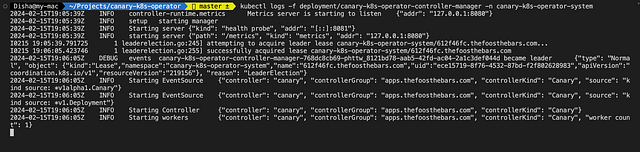
But before doing that, let's keep an eye on our operator’s logs and the deployment status to see the canary process in action.
kubectl logs -f deployment/<operator-deployment-name> -n <operator-namespace>
Sample Application Deployment:
apiVersion: apps/v1
kind: Deployment
metadata:
  name: example-app
  namespace: canary-k8s-operator-system
spec:
  replicas: 10
  selector:
    matchLabels:
      app: example-app
  template:
    metadata:
      labels:
        app: example-app
    spec:
      containers:
      - name: nginx
        image: nginx:1.21.1
        ports:
        - containerPort: 80
By applying our Canary custom resource, we initiate the operator logic, resulting in the creation of a canary deployment alongside our original application.

Example Canary CR for testing
apiVersion: apps.thefoosthebars.com/v1alpha1
kind: Canary
metadata:
  name: example-app-canary
  namespace: canary-k8s-operator-system
spec:
  deploymentName: example-app
  image: nginx:1.21.4
  replicas: 1

  percentage: 20
Going by the logic in the reconciliation code of our controller, we should get 2 replicas of our Canary CR.
totalReplicas := *originalDeployment.Spec.Replicas
 canaryReplicas := int32(math.Ceil(float64(totalReplicas) * float64(canary.Spec.Percentage) / 100))
Let's apply the Canary CR manifest and fetch the list of pods,
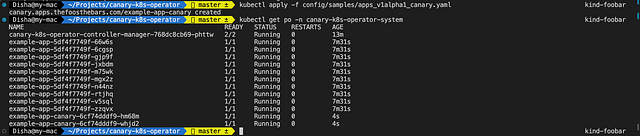
Great! Now, let's check the Operator logs as well,
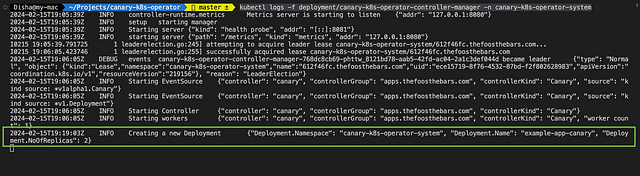
By applying our Canary CR, we initiate the operator logic, resulting in the creation of a Canary deployment alongside our original example app.
Observing the operator's actions, we can verify the successful rollout of our Canary deployment, ensuring it meets our specified parameters.
Conclusion
As we conclude this series, I want to share with heartfelt honesty that it’s been a truly insightful and enriching journey for me too. Along the way, I encountered my own set of challenges, stumbling at a few points. This experience has led me to contemplate whether to extend our series to delve into additional concepts such as OperatorSDK, the Operator pattern, and the intricacies of Go syntax, especially in the context of writing custom K8s resources.
Throughout this hands-on journey, we’ve tackled the essentials of creating a K8s operator for Canary deployments. From defining CRDs to writing controller logic and securing the necessary RBAC configurations, we’ve navigated the fundamental steps in automating deployment strategies within K8s.
As I always say, let the journey continue; continue experimenting, exploring, and learning as you harness the full potential of K8s operators to streamline our deployment processes.🚀.
More from Disha Virk
Recommended from Medium
[
See more recommendations
](https://medium.com/?source=post_page---read_next_recirc--3c3672edd99c---------------------------------------)