Understanding Canary Deployments in Kubernetes Part 1: Introduction to Operators and the Operator…

With the intent of contributing to the K8s community, I often find myself pondering the vast landscape of deployment strategies that K8s offers. Despite the overwhelming number of articles that discuss these strategies theoretically, a noticeable gap exists between theoretical knowledge📚 and practical application. My goal is to help bridge this gap.
I would like to move beyond the theoretical echo chamber and dive deep into the mechanics of one such deployment strategy, providing a tangible, working example for us to learn from. This curiosity-driven exploration led me through a weekend filled with new concepts 🤯, unexpected errors🚨, and extensive debugging sessions🕵🏻♀️. Despite the hurdles, the journey — and particularly the outcomes — proved to be incredibly valuable, providing insights and lessons worth sharing.
So, let us embark on this incredible ride together, starting with an in-depth look at K8s operators and the Operator SDK, tools at the forefront of simplifying complex K8s operations🛠️🔧.
Kubernetes Operators: Simplifying Complexity
At the heart of K8s’ ability to manage complex, stateful applications lies a powerful concept: Operators.
Operators are specialized controllers that extend K8s’ capabilities, automating the management of application-specific tasks.
They embody the knowledge of seasoned experts, automating what they would do to deploy and manage applications in a Kubernetes cluster. This automation is pivotal for enterprises aiming to scale their operations seamlessly without burdening their DevOps teams with repetitive management tasks that can be "codified" and automated.
Operators vs. Controllers: Understanding the Difference
Before we delve deeper, it’s important to understand the distinction between Operators and Controllers.
In essence, all Operators are Controllers, but not all Controllers are Operators.
Controllers watch for changes to resources in a Kubernetes cluster and act to move the current state closer to the desired state. Whereas, Operators take this a step further by introducing domain-specific knowledge, enabling them to manage complex applications through the entire lifecycle, from deployment to scaling to updates.
Clear but still not clear enough? No problem, let's understand this in a bit more detail.
Controllers
At its core, K8s is built around the Controller pattern. What is a Controller? A Controller continuously monitors the state of various resources within the cluster, comparing the current state to the desired state. When it detects a discrepancy, it takes action(s) to reconcile the two. This pattern is fundamental to K8s’ self-healing mechanism, ensuring that the actual state of the cluster matches what’s defined by the user.
For example: Consider the ReplicaSet controller - its job is to ensure that the number of pod replicas in the cluster matches the number specified by the user. If a pod in a ReplicaSet fails, the controller notices the discrepancy between the desired state (e.g., 3 replicas) and the current state (e.g., 2 replicas) and responds by creating a new pod to maintain availability.
Operators
Operators are a step beyond controllers. They are Custom Controllers with domain-specific knowledge baked into them. This allows them to manage the lifecycle of complex applications and perform specific actions that go beyond simple CRUD (Create, Read, Update, Delete) operations. Operators are designed to automate tasks that would typically require human intervention, such as managing upgrades, configurations, or backups of a service.
For example: Imagine a DB like PostgreSQL running within a K8s cluster. Managing this DB involves tasks like provisioning instances, scaling them according to load, performing backups, and upgrading to new versions without downtime. An Operator for PostgreSQL would understand these domain-specific tasks and automate them. For instance, the Operator could automatically trigger a backup before an upgrade or scale the database by adding replicas when the load increases.
I just realized that perhaps, I opened Pandora’s box 🔮 by giving an example of one of the highly debatable topics in the K8s community — Running stateful applications like DBs in K8s clusters 🗃️.
Well, let’s park this topic for another day! 🚀
Key Differences
Let's summarize the key differences here before we proceed to the next topic.
- Scope of Action: Controllers generally manage K8s’ built-in resources and ensure they match the desired state.
Operators, however, manage custom resources with specific, often complex, operational logic that understands the application’s lifecycle and operational requirements. - Domain Knowledge: While Controllers operate with a generalized understanding of resources in K8s, Operators are constructed with domain-specific knowledge that allows them to perform sophisticated management tasks that are specific to an application or service.
Introducing the Operator SDK

Operator SDK — provides the tools to build, test, and package K8s Operators
Enter the Operator SDK, a component of the Operator Framework that simplifies the process of building, testing, and packaging K8s Operators.
The Operator SDK offers a powerful toolkit for developers, abstracting much of the complexity involved in writing operators. It provides scaffolding for new operators, testing utilities, and integration with the broader Kubernetes ecosystem, making it an invaluable resource for developers embarking on the operator development journey.
Three Flavors of Operator Development
One of the Operator SDK’s key strengths is its support for three different development models, catering to various skill sets and use cases:
- Go: For developers who prefer working directly with code, the SDK supports creating operators in Go, the language K8s itself is written in. This approach offers the most flexibility and control, allowing developers to leverage the full power of Go and the Kubernetes client libraries.
- Ansible: For those who are more familiar with automation and configuration management. Writing operators in Ansible allows developers to use YAML and Ansible playbooks to define the operational logic, making it accessible to those who might not be comfortable writing Go code.
- Helm: For applications that are already deployed using Helm charts, the SDK supports developing operators based on these charts. This simplifies the transition of Helm-managed applications to fully automated operators, making it a quick and efficient way to automate the deployment and management of such applications in Kubernetes.
I would highly recommend to check out its official documentation.
Setting Up Your Environment
Before we can harness the power of the Operator SDK, we must first set up our development environment for this demo.
Prerequisites ✅
- K8s Cluster: Ensure you have access to a K8s cluster. I used
kindto set up my local cluster due to its simplicity and minimal requirements, in case you are unfamiliar with it, please check out the steps here in my previous post — Building and Extending Kubernetes: Writing My First Custom Controller with Go - Operator SDK: This tutorial uses the Operator SDK for creating the operator. Install the Operator SDK following the instructions from its official documentation.
- Go Programming Language: Basic knowledge of Go will be nice to have.
- kubectl: Tool for interacting with our K8s cluster.
Step 1: Project Setup
We start by creating the project folder.
mkdir my-canary-operator && cd my-canary-operator
Step 2: Creating the Operator
First, we create a new operator project using the Operator SDK.
operator-sdk init --domain example.com --repo github.com/example/canary-operator
Then, create a new API for the operator:
operator-sdk create api --group apps --version v1alpha1 --kind Canary --resource --controller
This command creates the scaffolding for the Canary resource and its controller.
Step 3: Defining the Canary Resource
Edit the api/v1alpha1/canary_types.go file to define the spec and status for the Canary resource. This will represent a Canary Deployment.
/*
Copyright 2024.

Licensed under the Apache License, Version 2.0 (the "License");
you may not use this file except in compliance with the License.
You may obtain a copy of the License at

    http://www.apache.org/licenses/LICENSE-2.0

Unless required by applicable law or agreed to in writing, software
distributed under the License is distributed on an "AS IS" BASIS,
WITHOUT WARRANTIES OR CONDITIONS OF ANY KIND, either express or implied.
See the License for the specific language governing permissions and
limitations under the License.
*/

// Package v1alpha1 defines the version of the API group.
package v1alpha1

import (
 metav1 "k8s.io/apimachinery/pkg/apis/meta/v1" // Import the metav1 package for K8s metadata
)

// CanarySpec defines the desired state of Canary
// It specifies what we want
type CanarySpec struct {
 DeploymentName string \`json:"deploymentName"\` // Name of the Deployment to be managed
 Image          string \`json:"image"\`          // The container image to use in the canary deployment
 Percentage     int    \`json:"percentage"\`     // The % of traffic to be directed to the canary deployment
 Replicas       int32  \`json:"replicas"\`       // The no. of replicas for the canary deployment
}

// CanaryStatus defines the observed state of Canary
// It reflects the current state of the canary deployment as observed by the operator
type CanaryStatus struct {
 Phase string   \`json:"phase"\`    // The current phase of the canary deployment (e.g., "Deploying", "Stable")
 Nodes []string \`json:"nodes,omitempty"\` // List of nodes where the canary pods are running. It is optional
}

//+kubebuilder:object:root=true
//+kubebuilder:subresource:status

// Canary is the Schema for the canaries API
// This top-level type represents a Canary resource in K8s
type Canary struct {
 metav1.TypeMeta   \`json:",inline"\` // Includes API version and kind
 metav1.ObjectMeta \`json:"metadata,omitempty"\` // Standard object metadata

 Spec   CanarySpec   \`json:"spec,omitempty"\`   // Desired state specified by the user
 Status CanaryStatus \`json:"status,omitempty"\` // Observed state reported by the operator
}

//+kubebuilder:object:root=true

// CanaryList contains a list of Canary.
// This type is used to list or watch multiple Canary resources
type CanaryList struct {
 metav1.TypeMeta \`json:",inline"\` // Includes API version and kind for the list
 metav1.ListMeta \`json:"metadata,omitempty"\` // Standard list metadata
 Items           []Canary \`json:"items"\` // The list of Canary resources
}

func init() {
 SchemeBuilder.Register(&Canary{}, &CanaryList{}) // Registers the Canary and CanaryList types with the runtime scheme
}
Now, we need to run make generate to generate the CRD manifests and make manifests to generate CRD and RBAC yaml files.

Step 5: Building and Deploying the Operator
Build the operator’s Docker image:
make docker-build IMG="<your-dockerhub-registry/canary-operator:v1"
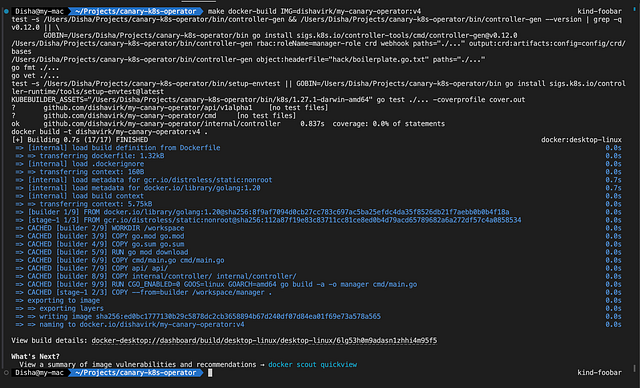
Push the operator to the Docker Hub registry:
make docker-push IMG="<your-dockerhub-registry/canary-operator:v1"

Deploy the operator to the cluster:
make deploy IMG="<your-dockerhub-registry/canary-operator:v1"
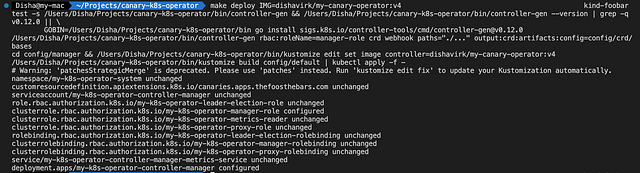
This command uses the K8s manifests generated by the Operator SDK (located in the config/ directory of the project) to deploy the operator to the cluster, pulling the Docker image we just pushed to Docker Hub.
Some Things to Remember
- The first time we deploy the operator to any cluster, the Operator SDK sets up various resources (like Service Account, Roles, RoleBindings, and the Custom Resource Definition) that the operator needs to function.
- If you make changes to the operator code, you’ll need to rebuild and repush the Docker image and then redeploy the operator to the cluster to test the changes.
- Please note that if you modify the RBAC manifests, such as adding additional permissions to the Operator’s ClusterRole, it is essential to apply these changes to your cluster using the
kubectl applycommand followed by the file path of the updated ClusterRole manifest.
This step is crucial to ensure that the Operator has all necessary permissions to function correctly. I've highlighted this based on an error I encountered during the later stages of development, underscoring its importance in the setup process.
Note: Updating the Docker image itself does not automatically update the ClusterRole in the K8s cluster. This is because ClusterRoles (and other RBAC resources) are K8s cluster configurations that exist independently of the operator’s Docker image. The Docker image contains operator’s binary (executable code), but the RBAC configurations are applied to the cluster directly from YAML manifests.
- Please do not remove the annotations that you see in the Canary Operator's code, without them the manifests won't generate correctly and you will encounter errors while building the Docker image.
//+kubebuilder:object:root=true
//+kubebuilder:subresource:status
These annotations are markers for the kubebuilder tool, which is part of the K8s Operator SDK. They give kubebuilder specific instructions on how to generate CRDs and additional configurations for custom resources.
Conclusion
With this, we conclude the first part of our series on building a K8s operator for managing canary deployments. We’ve laid the groundwork by defining our Custom Resource Definitions (CRDs) and setting up the necessary RBAC permissions, ensuring our operator has the framework it needs to interact with Kubernetes resources effectively.
In the next installment, we will check the controller logic. It will be responsible for fetching the specified Deployment based on the Canary CR, creating a new Deployment for the Canary version using the image specified in the CR if it doesn’t already exist, and adjusting the number of replicas for the Canary deployment as per the CR’s specifications.
Stay tuned as we continue to build on this foundation, enhancing our knowledge of K8s Operators' capabilities and Canary deployment strategy in K8s environments.🚀
More from Disha Virk
Recommended from Medium
[
See more recommendations
](https://medium.com/?source=post_page---read_next_recirc--0a0483d499a2---------------------------------------)