Policy management with Kyverno in EKS Using Terraform
Please do support me by following me in medium, and may be through buying me a coffee, thanks.## phanindra_sangers
I am a passionate DevOps Engineer Loved to explore how things works behind every tool
buymeacoffee.com
PreRequisites:
- An EC2 Instance / server
- Terraform Installed in it
- Kubectl installed init
- Git installed init
clone for Github Repo to find the Terraform Code and Manifests file for kyverno and Deployment file to create the Kyverno policies nad pods.## GitHub - Phanindra-Sangers/Policy-management-with-Kyverno-in-EKS-Using-Terraform
Contribute to Phanindra-Sangers/Policy-management-with-Kyverno-in-EKS-Using-Terraform development by creating an…
github.com
Run the Following Commands to create the kyverno in the EKS Cluster
terraform init
terraform validate
terraform plan
terraform apply
Description:
As containers are largely adopted in production environments, DevOps, Security, and Platform teams need a solution to effectively collaborate and manage Governance and Policy-as-Code (PaC). This ensures that all different teams are able to have the same source of truth in what regards to security, as well as use the same baseline “language” when describing their individual needs.
Kubernetes by its nature is meant to be a tool to build on and orchestrate, this means that out of the box it lacks pre-defined guardrails. In order to give builders a way to control security Kubernetes provides (starting on version 1.23) Pod Security Admission (PSA), a built-in admission controller that implements the security controls outlined in the Pod Security Standards (PSS), enabled by default in Amazon Elastic Kubernetes Service (EKS).
What is Kyverno
Kyverno (Greek for “govern”) is a policy engine designed specifically for Kubernetes. It is a Cloud Native Computing Foundation (CNCF) project allowing teams to collaborate and enforce Policy-as-Code.
The Kyverno policy engine integrates with the Kubernetes API server as Dynamic Admission Controller, allowing policies to mutate and validate inbound Kubernetes API requests, thus ensuring compliance with the defined rules prior to the data being persisted and ultimately applied into the cluster.
Kyverno allows for declarative Kubernetes resources written in YAML, with no new policy language to learn, and results are available as Kubernetes resources and as events.
Kyverno policies can be used to validate, mutate, and generate resource configurations, and also validate image signatures and attestations, providing all the necessary building blocks for a complete software supply chain security standards enforcement.
How Kyverno Works:
As mentioned above, Kyverno runs as a Dynamic Admission Controller in an Kubernetes Cluster. Kyverno receives validating and mutating admission webhook HTTP callbacks from the Kubernetes API server and applies matching policies to return results that enforce admission policies or reject requests. It can also be used to Audit the requests and to monitor the Security posture of the environment before enforcing.
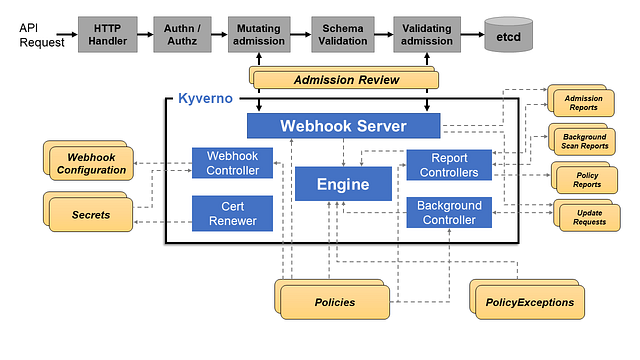
The two major components are the Webhook Server & the Webhook Controller. The Webhook Server handles incoming AdmissionReview requests from the Kubernetes API server and sends them to the Engine for processing. It is dynamically configured by the Webhook Controller which watches the installed policies and modifies the webhooks to request only the resources matched by those policies.
Now Let us look into the Practical Demos
Practical Lab:
using the terraform code present in the GitHub create the EKS cluster, VPC, Kyverno in the cluster.
validation:
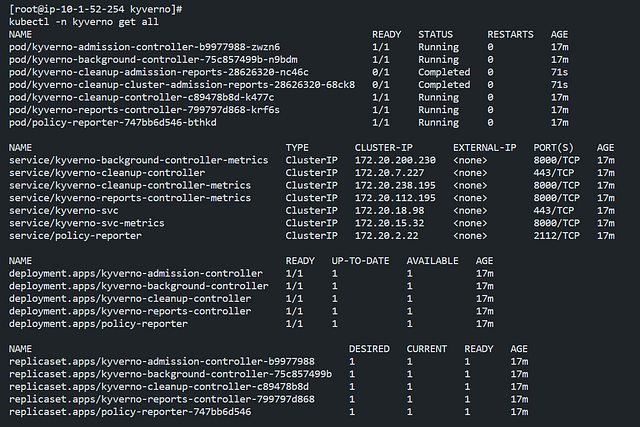
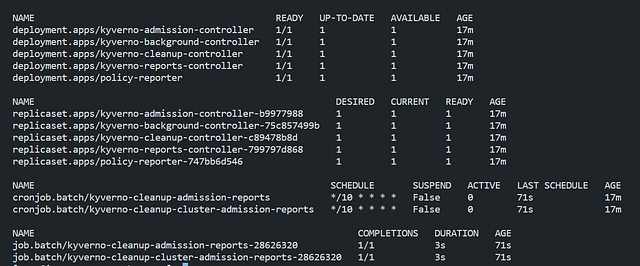
To validate whether Kyverno has been succesfully installed or not
kubectl -n kyverno get all
Creating a Simple Policy:
To get an understanding of Kyverno Policies, we will start our lab with a simple Pod Label requirement. As you may know, Labels in Kubernetes can be used to tag objects and resources in the Cluster.
Below we have a sample policy requiring a Label Author
apiVersion: kyverno.io/v1
kind: ClusterPolicy
metadata:
  name: require-labels
spec:
  validationFailureAction: Enforce
  rules:
    - name: check-team
      match:
        any:
          - resources:
              kinds:
                - Pod
      validate:
        message: "Label 'Author' is required to deploy the Pod"
        pattern:
          metadata:
            labels:
              Author: "?*"
Kyverno has 2 kinds of Policy resources, ClusterPolicy used for Cluster-Wide Resources and Policy used for Namespaced Resources. The example above shows a ClusterPolicy. Take sometime to dive deep and check the below details in the configuration.
- Under the spec section of the Policy, there is a an attribute
validationFailureActionit tells Kyverno if the resource being validated should be allowed but reportedAuditor blockedEnforce. Defaults to Audit, the example is set to Enforce. - The
rulesis one or more rules to be validated. - The
matchstatement sets the scope of what will be checked. In this case, it is anyPodresource. - The
validatestatement tries to positively check what is defined. If the statement, when compared with the requested resource, is true, it is allowed. If false, it is blocked. - The
messageis what gets displayed to a user if this rule fails validation. - The
patternobject defines what pattern will be checked in the resource. In this case, it is looking formetadata.labelswithAuthor.
The Above Example Policy, will block any Pod Creation which doesn’t have the label Author present in it.
validation:
Deployment with out Labels:
Before applying the policy just create a sample deployment with out label of Name
Here is the Deployment File:
copy the content in that path and paste it in a File## Policy-management-with-Kyverno-in-EKS-Using-Terraform/kube-manifests/deployment-with-out-label.yaml…
Contribute to Phanindra-Sangers/Policy-management-with-Kyverno-in-EKS-Using-Terraform development by creating an…
github.com
apiVersion: apps/v1
kind: Deployment
metadata:
  creationTimestamp: null
  labels:
    app: nginx
  name: nginx
spec:
  replicas: 1
  selector:
    matchLabels:
      app: nginx
  strategy: {}
  template:
    metadata:
      creationTimestamp: null
      labels:
        app: nginx
    spec:
      containers:
      - image: nginx
        name: nginx
        resources: {}
status: {}
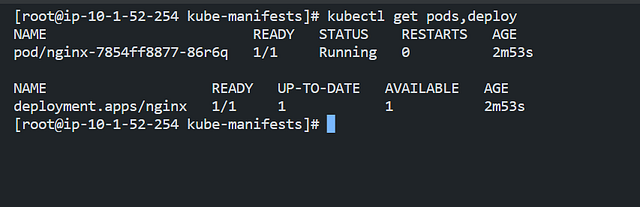
kubectl apply -f file_name.yaml
Run the Above command
Now Apply the Kyverno policies:## Policy-management-with-Kyverno-in-EKS-Using-Terraform/kyverno-manifests/kyverno-cluster-wide-policie…
Contribute to Phanindra-Sangers/Policy-management-with-Kyverno-in-EKS-Using-Terraform development by creating an…
github.com
apiVersion: kyverno.io/v1
kind: ClusterPolicy
metadata:
  name: require-labels
spec:
  validationFailureAction: Enforce
  rules:
    - name: check-team
      match:
        any:
          - resources:
              kinds:
                - Pod
      validate:
        message: "Label 'Author' is required to deploy the Pod"
        pattern:
          metadata:
            labels:
              Author: "?*"
Apply Above with Kubectl apply -f file_name.yaml
Kubectl apply -f file_name.yaml
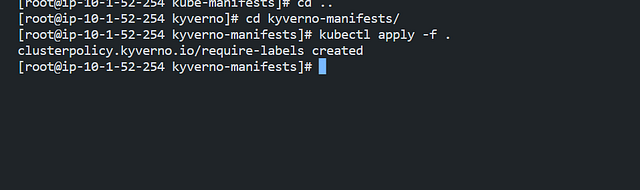
Now check the deployments and pods
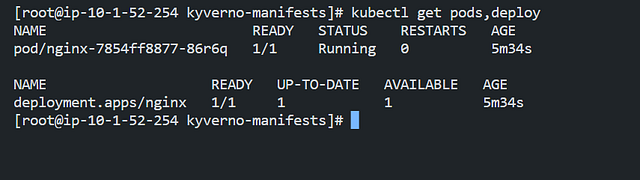
As you can see still the PODs are running because

Check the running Pod doesn’t have the required Label and Kyverno didn’t terminate it, this happened because as seen earlier, Kyverno operates as an AdmissionController and will not interfere in resources that already exist in the cluster.
However if you delete the running Pod, it won’t be able to be recreated since it doesn’t have the required Label. Go ahead and delete de Pod running in the default Namespace.
kubectl -n default delete pod --all

kubectl -n default get pods

As mentioned, the Pod was not recreated, try to force a rollout of the nginx deployment.
kubectl -n default rollout restart deployment/nginx
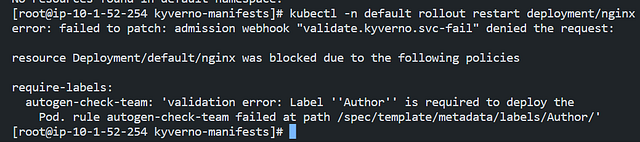
The rollout failed with the admission webhook denying the request due to the require-labels Kyverno Policy.
You can also check this error message describing the nginx deployment, or visualizing the events in the default Namespace.
kubectl -n default describe deployment nginx
kubectl -n default get events | grep PolicyViolation


Now add the required label Author to the nginx Deployment.
Find the template to that here.## Policy-management-with-Kyverno-in-EKS-Using-Terraform/kube-manifests/deployment-with-label.yaml at…
Contribute to Phanindra-Sangers/Policy-management-with-Kyverno-in-EKS-Using-Terraform development by creating an…
github.com


As you can see the admission webhook successfully validated the Policy and the Pod was created with the correct Label Author=phani!
Note: Terminate the above resources created, deployment
Mutating Rules
In the above examples, you checked how Validation Policies work in their default behavior defined in validationFailureAction. However Kyverno can also be used to manage Mutating rules within the Policy, in order to modify any API Requests to satisfy or enforce the specified requirements on the Kubernetes resources. The resource mutation occurs before validation, so the validation rules will not contradict the changes performed by the mutation section.
Below is a sample Policy with a mutation rule defined, which will be used to automatically add our label Author=phani as default to any Pod.
apiVersion: kyverno.io/v1
kind: ClusterPolicy
metadata:
  name: add-labels
spec:
  rules:
    - name: add-labels
      match:
        any:
          - resources:
              kinds:
                - Pod
      mutate:
        patchStrategicMerge:
          metadata:
            labels:
              Author: phani
```## [Policy-management-with-Kyverno-in-EKS-Using-Terraform/kyverno-manifests/kyverno-cluster-wide-policie…](https://github.com/Phanindra-Sangers/Policy-management-with-Kyverno-in-EKS-Using-Terraform/blob/main/kyverno-manifests/kyverno-cluster-wide-policies-mutation-webhook.yaml?source=post_page-----83b58712d491---------------------------------------)

Contribute to Phanindra-Sangers/Policy-management-with-Kyverno-in-EKS-Using-Terraform development by creating an…

github.com

[View original](https://github.com/Phanindra-Sangers/Policy-management-with-Kyverno-in-EKS-Using-Terraform/blob/main/kyverno-manifests/kyverno-cluster-wide-policies-mutation-webhook.yaml?source=post_page-----83b58712d491---------------------------------------)

you can also find the code here

Notice the `mutate` section, under the ClusterPolicy `spec`.

Go ahead, and create the above Policy using the following command.

```c
kubectl apply -f file_name.yaml

Now create the deployment with out label:## Policy-management-with-Kyverno-in-EKS-Using-Terraform/kube-manifests/deployment-with-out-label.yaml…
Contribute to Phanindra-Sangers/Policy-management-with-Kyverno-in-EKS-Using-Terraform development by creating an…
github.com
Find the content of the Deployment here.

Validate the automatically added label Author=phani in above image to the Pod to meet the policy requirements, resulting a successful Pod creation even with the Deployment not having the label specified:
This was just a simple example of labels for our Pods with Validating and Mutating rules. This can be applied to various scenarios such as restricting Images from unknown registries, adding Data to Config Maps, Tolerations and much more. In the next upcoming labs, you will go through some more advanced use-cases.
Follow me in Linked in
https://www.linkedin.com/in/phanindra-sangers-0225a516a/
KubeStronaut || AWS Community Builder || CKS CKAD CKA Certified || SRE/DEVOPS ENGINEER || https://www.buymeacoffee.com/phanindra_sangers