How to work with Gateway-API with Cilium inside AWS EKS (Kubernetes), and have support for AWS…
Sitemap## DevOps Engineer, Software Architect and Software Developering

Sharing of much content of DevOps Engineer, Software Architect or Software Developer to teach more people to bee better specialist in the field. Primary focus are DevOps
Changing from an Application Load Balancer out to a Network Load Balancer will give you full control over the network traffic you received from level 7 to level 3/4 with a Network Load Balance.
I’m working a lot with Kubernetes management by AWS EKS service, I have applied Cilium as security for network and pod, and love when I have full control over the security, and here Cilium is a very great tool for me to use inside Kubernetes.
First of all, when you replace Ingress with Application Load Balancer out with Gateway-API with Network Load Balancer you will change the operation level of the responsibility here, you are going from level 7 traffic to level 3/4 traffic, so you need to know more about security before you do this in production!
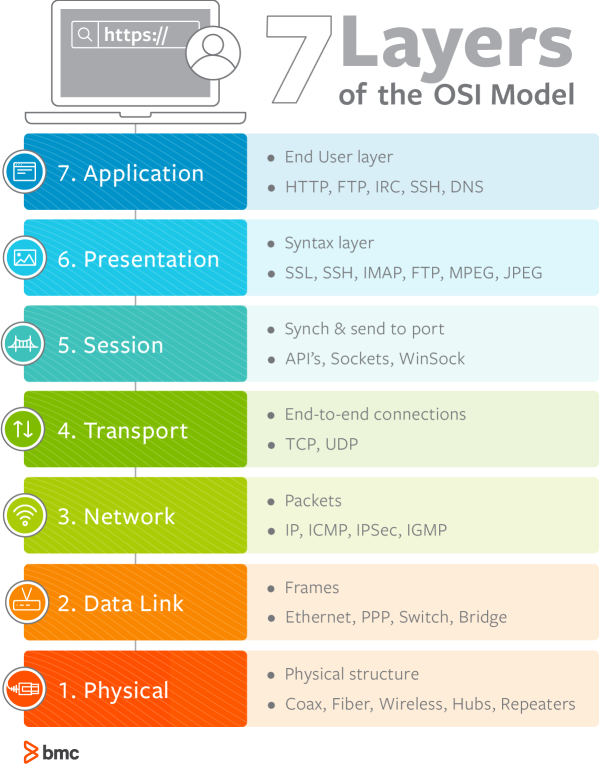
Read more about the layers on BMC
Kubernetes controller you need to use for this article:
I’m using different controllers in this article, and you should expect to have these controllers on your system already.
- Gateway-API
- External-DNS
- Cilium
- cert-manager
- AWS Load Balancer Controller
Changes in your cluster infrastructure
The first thing we will start with if you do not already have it installed, we will start to apply the Gateway-API controller to your AWS EKS cluster by to lines command.
When it's applied we need to change some configuration for our Cilium setup, we need to enable Gateway-API and install the Cilium ingress controller, it works by changing this setting here.
This allows Cilium and Gateway-API to work together, now we need to update our external-dns setup a little bit, and we need to add sources related to Gateway-API.
If not you make this change to your external-dns controller it won't do changes in Route 53 for your domain, so it's very important to automate your DNS changes from Kubernetes.
Now we need a way to generate SSL eg. You can use AWS ACME or you can pick to use Lets Encrypt with cert-manger another way to do this, I will pick cert-manager so I can control my certificates inside my Kubernetes cluster.
This can be applied with AWS CDK as HelmChart, after it's applied we will create a role this controller is allowed to assume.
Now we need to create a role, I call it dns-manager and I’m using AWS CDK to create this user, but you can use Terraform or manually create this user, imported Kubernetes should be allowed to use this user inside the cluster with a service account, so that's why I’m using AWS CDK I fell it easier to use.
So let's first create our new role with AWS CDK and apply it.
This will create a role and the service account there will be needed for cert-manger, so we are ready to go:) but…. be sure to restart Cilium to be sure it's working as expected after we have touched it.
Let's create a Lets Encrypt certificate using Route53 DNS validation
Now we will be ready to start the fun of everything, to create a certificate, so first we need to apply a cluster issuer to the cert-manager, you can use an issuer but the cluster issuer will make the issuer for your domain global so it's up to you what you pick, but I will use cluster issuer in this case.
Now it's needed to create a TLS certificate as a secret, i haven’t found an optimal way to do this with a Kubernetes custom resource a the point, so it will be done manually, You can use OpenSSL to generate what you need and then apply the files as a secret, It is recommended to create a new TLS for each namespace you will create certificates with and for each domain.
When it's applied you will be ready to create your first Gateway-API setup using the AWS NLB (Network Load Balancer)
Stop using Ingress and start using Gateway-API with the Cilium ingress class
Now we can add our Gateway and HTTPRoute resource to the system and apply it, remember the HTTPRoute points to a service so you need an application running already.
When it's applied there will be created network load balancer (NLB) based on the gateway, it will be internal (private) so we need to change it to internet-facing (public) before you can access it with your domain.
To do that we need to annotate it to ensure it's working for the public.
Just wait until your NLB (Network Loadbalancer) is ready again, and you will now be ready to access your domain!:)
Remember it can take some time 5–10min to be ready for everything, so relax when you apply it:)

Sharing of much content of DevOps Engineer, Software Architect or Software Developer to teach more people to bee better specialist in the field. Primary focus are DevOps
DevOps Engineer, Software Architect, Software Developer, Data Scientist and identify me as a non-binary person.
More from Paris Nakita Kejser and DevOps Engineer, Software Architect and Software Developering
Recommended from Medium
[
See more recommendations
](https://medium.com/?source=post_page---read_next_recirc--8a1eb0618112---------------------------------------)