Docker — Master Docker Layer Caching
What is Docker Layer Caching?
Docker Layer Caching is a feature of Docker, a popular containerization platform, that enhances the efficiency of building Docker images. When a Docker image is built, it is composed of multiple layers, with each layer representing a filesystem change.
Layer caching works by caching the intermediate layers of an image during the image build process. When Docker builds an image, it executes each instruction in the Dockerfile, creating a new layer for each instruction. If a layer has not changed since the last build, Docker can reuse the cached layer instead of rebuilding it. This significantly speeds up the image build process, especially when changes are made to the Dockerfile or application code.
Layer caching helps reduce the time and resources required to build Docker images, making the development and deployment process more efficient. It is particularly beneficial in Continuous Integration/Continuous Deployment (CI/CD) pipelines where frequent image builds are performed.

Pic from r-bloggers
When you generate an image based on the Dockerfile, and use the container generated by this image to shorten the life cycle of the container as much as possible, please do not use the container as a vm. The container can be stopped or destroyed, and then a new container can be regenerated according to the changes in settings and configuration.
Even though Docker greatly reduces the difficulty of getting started with container technology, there are many skills to understand in the process of building a container image that is both powerful and compact.
Layer Caching in Docker
When building a Docker image, each command in the Dockerfile adds a new layer to the image. These layers capture the changes made to the filesystem by each command. Docker employs a caching mechanism to store these intermediate layers.
If a command is executed and its outcome is identical to a previous build, Docker can reuse the cached layer rather than rebuilding it. This caching strategy significantly accelerates the image building process, particularly when there are no changes to certain parts of the Dockerfile or application code.
To expedite the build process, Docker introduced caching. This means that if there are no changes to the Dockerfile and associated files, Docker can reuse certain existing layers stored in the local cache when rebuilding.
However, to leverage caching effectively, it’s essential to comprehend its workings.

The Core Process
During the creation of an image from a Dockerfile, Docker routinely examines the potential for utilizing existing caching:
- For the majority of commands, if the command text remains unchanged, Docker employs the cached version.
- In the case of COPY/ADD commands, Docker additionally verifies if the file to be copied has undergone alterations. If the content of all external files on the initial COPY command remains consistent, the layer cache will be activated, and all ensuing commands until the subsequent ADD or COPY command will rely on the layer cache.
For example:
FROM python:3.11-slim-buster
COPY . .
RUN pip install -r requirements.txt
ENTRYPOINT ["python", "main.py"]
When you run docker build at the first time, all the commands will run:
$ time docker build -t local/test:0.0.1 .
Sending build context to Docker daemon  4.096kB
Step 1/4 : FROM python:3.11-slim-buster
 ---> 2e67d6d46b8c
Step 2/4 : COPY . .
 ---> Using cache
 ---> 47c7b989935d
Step 3/4 : RUN pip install -r requirements.txt
 ---> Using cache
 ---> 38a905e7f0d7
Step 4/4 : ENTRYPOINT ["python", "main.py"]
 ---> Running in 9ef3b06d8ab3
Removing intermediate container 9ef3b06d8ab3
 ---> c825c90308e6
Successfully built c825c90308e6

real 0m9.981s
user 0m0.030s
sys 0m0.030s
In the above command output:
Sending build context to Docker daemon: Docker sends the build context to the Docker daemon. This includes all the files in the current directory and its subdirectories.Step 1/4 : FROM python:3.11-slim-buster: Docker starts building the image by pulling the base imagepython:3.11-slim-buster.Step 2/4 : COPY . .: Docker copies the files from the build context to the image. In this case, it uses the cache since the files have not changed.Step 3/4 : RUN pip install -r requirements.txt: Docker installs the Python dependencies specified inrequirements.txt. It also uses the cache because the contents ofrequirements.txthave not changed.Step 4/4 : ENTRYPOINT ["python", "main.py"]: Docker sets the entry point for the container to executepython main.py.Successfully built c825c90308e6: Docker successfully built the image with the specified commands. The image ID isc825c90308e6.
Notice it took 10 seconds to build at the first time. Now let’s build it again without any changes. Since there are no changes, Docker will use mirror caching:
$ time docker build -t local/test:0.0.1 .
Sending build context to Docker daemon   5.12kB
Step 1/4 : FROM python:3.11-slim-buster
 ---> 09c82f264230
Step 2/4 : COPY . .
 ---> Using cache
 ---> b45e0dca3d5c
Step 3/4 : RUN pip install -r requirements.txt
 ---> Using cache
 ---> 77da00992a6f
Step 4/4 : ENTRYPOINT ["python", "main.py"]
 ---> Using cache
 ---> 8b88e5f78b9f
Successfully built 8b88e5f78b9f
Successfully tagged sample:latest
real 0m0.117s
user 0m0.025s
sys 0m0.025s
Notice this time it only used less than a second. With layer caching, you could potentially save a lot of time.
How Caching Works
If a layer is ineligible for caching, subsequent layers cannot be retrieved from the cache.
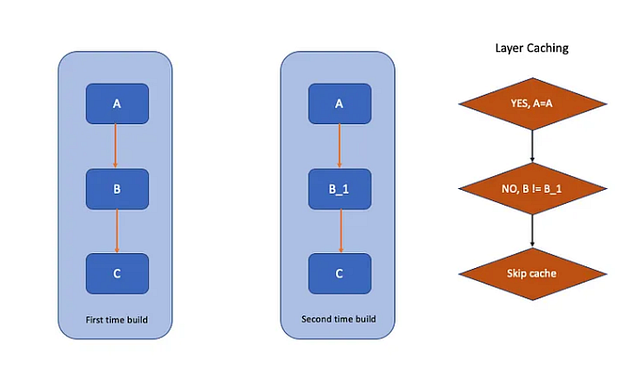
Now let’s take a look at the following Dockerfile:
FROM python:3.11-slim-buster
COPY requirements.txt .
COPY main.py .
RUN pip install -r requirements.txt
ENTRYPOINT ["python", "main.py"]
What makes the provided Dockerfile inefficient is that if any file included in the COPY command is modified, it renders all subsequent layers of cache invalid. Consequently, we must rerun the pip install command. Since this layer is typically not cached, it can significantly prolong the build process.
Since requirements.txt doesn’t change as often as main.py, so you could improve the build efficiency by moving the pip install command above COPY main.py, such as:
FROM python:3.11-slim-buster
COPY requirements.txt .
RUN pip install -r requirements.txt
COPY main.py .
ENTRYPOINT ["python", "main.py"]
Given that main.py is copied to the build context only after pip installation, provided requirements.txt remains unaltered, the layer generated by the last pip installation remains retrievable from the cache.
To optimize Docker image building and utilize cached layers effectively, meticulous design of the Dockerfile is essential, adhering to the following guidelines:
- Copy only the necessary files for the subsequent steps to minimize cache invalidation during the build process.
- Place the ADD and COPY commands at the bottom of the Dockerfile.
Tidy Up the Cache
It’s advisable to perform cleanup operations after package installations, such as executing rm -rf /var/cache/yum following a yum install command in your Dockerfile. However, it’s not sufficient to merely include RUN rm -rf /var/cache/yum in a single line, as each command in the Dockerfile is stored as a separate layer and applied layer by layer. Consider the example below:
RUN yum install -y nginx
RUN yum clean all
RUN rm -rf /var/cache/yum
In this scenario, the container image will consist of three layers, and the RUN yum install -y nginx layer will retain its cache files if there are no changes. Therefore, even with the subsequent RUN rm -rf /var/cache/yum command, the cache persists. It’s akin to mounting a file system onto another file system, where the files remain present but are invisible and inaccessible.
Hence, the appropriate approach is:
RUN yum install -y nginx \
        && yum clean all \
        && rm -rf /var/cache/yum
By consolidating multiple commands into a single command, only one layer is utilized in the resultant image. While this approach minimally compromises caching benefits and slightly extends the container image build time, it ensures that the cleaned-up cache files are not retained in the final image. Consequently, significant disk space can be saved in the final container image, and Docker’s cache can still be leveraged to expedite development processes.
Best Practices
- Leverage Layer Caching: Docker builds images using layers, and it caches intermediate layers. Leverage this caching mechanism by structuring your Dockerfile to minimize changes in layers that are unlikely to change frequently.
- Optimize Dependency Installation: Separate dependency installation from application code copying to avoid reinstalling dependencies on every code change.
FROM node:14 AS build WORKDIR /app COPY package*.json ./ RUN npm install COPY . . RUN npm run build - Use Multi-Stage Builds: Utilize multi-stage builds to reduce the size of the final image and improve caching. Separate build-time dependencies from runtime dependencies and discard unnecessary build artifacts.
# Stage 1: Build stage FROM node:14 AS build WORKDIR /app COPY package*.json ./ RUN npm install COPY . . RUN npm run build # Stage 2: Production stage FROM nginx:alpine COPY --from=build /app/build /usr/share/nginx/html - Minimize Build Context: Exclude unnecessary files from the build context using
.dockerignoreto reduce the size of the build context and speed up builds.# .dockerignore node_modules .git .env - Leverage Caching for Immutable Files: Ensure that files that rarely change (e.g., system packages, libraries) are cached by Docker. These files should be copied before frequently changing files to maximize caching benefits.
FROM python:3.11-slim WORKDIR /app COPY requirements.txt . RUN pip install -r requirements.txt COPY . . - Explicitly Invalidate Cache When Necessary: Use cache-busting techniques like adding a dummy file or changing the working directory to invalidate the cache when specific files or dependencies change.
FROM node:21
WORKDIR /app
COPY package*.json ./
RUN npm install
COPY . .
# Use a dummy file to invalidate cache
RUN touch /dummyfile-$(date +%s)
RUN touch /dummyfile-$(date +%s): This command creates a dummy file named dummyfile with the current timestamp as part of its name. The purpose of this command is to invalidate Docker's cache for subsequent build steps, ensuring that they are not cached and re-executed whenever the Dockerfile is rebuilt, even if there are no changes in the preceding steps. This technique is commonly used to prevent Docker from reusing cached layers unnecessarily, especially when specific files or dependencies change frequently.
Conclusion
In conclusion, optimizing Docker build caching is essential for improving image build efficiency and reducing build times. By following best practices such as leveraging layered Dockerfiles, separating static and dynamic dependencies, minimizing the build context, and explicitly invalidating the cache when necessary, developers can effectively utilize Docker’s caching mechanism to speed up image builds and enhance development workflows.
Additionally, techniques like using cache-busting commands ensure that Docker builds remain consistent and reliable, even in environments where files or dependencies change frequently. Overall, understanding and implementing Docker build caching best practices can lead to significant improvements in development productivity and resource utilization.
More from Tony
Recommended from Medium
[
See more recommendations
](https://medium.com/?source=post_page---read_next_recirc--dbbb90d06232---------------------------------------)