ROLLOUTS
Introduction
Chapter Overview and Objectives
In this chapter, we delve into Argo Rollouts, a pivotal tool within the Argo suite, designed specifically for Continuous Delivery (CD) and GitOps practices. Argo Rollouts can be used as a stand-alone tool and therefore does not require any prior knowledge of ArgoCD (or other Argo-related tools). Through thematic discussions and hands-on labs, we aim to equip you with a comprehensive understanding of Argo Rollouts’ architecture, installation, and usage.
By the end of this chapter, you should be able to:
Understand and differentiate various Progressive Delivery patterns and decide when to use which. Have a thorough understanding of what Argo Rollouts is and in what scenarios it might help. Have an overview of Argo Rollouts architecture and functionality.
Argo Rollouts Features
Progressive Delivery: Déployer progressivement de nouvelles versions de logiciels à un sous ensemble d'utilisateurs pour minimiser le risque Rollout CRD: Rollout Controller est un CRD Kubernetes qui remplace l'objet de déploiement standard pour permettre ces stratégies avances Canary Release: Expose une nouvelle version à un petit groupe d'utilistaur pour des test en direct avant un déploiement complet Blue-Green Deployment: Fonctionner deux environement blue est stable et green est la nouvelle version. Switch traffic une fois que green est déployer green deviens blue Analysis (metric providers): Intéroge des fourniseur de metriques comme Prometheus pour verfiiser si la nouvelle version est saine avant de continuer Traffic Shaping: % pourcentage d'utilisateur qui bascule sur la nouvelle version (ingress controllers ou service mesh) Automated rollbacks: Scrap des donnée de performance si l'analyse échoue le déploiement est automatiquement rétablie a la version stable précédente gitops integration:
Architecture
In this section, we will discuss the building blocks of Argo Rollouts. To give you an overview of what to expect, we’ll briefly describe the relevant components of an Argo Rollouts setup before we discover them in more detail.
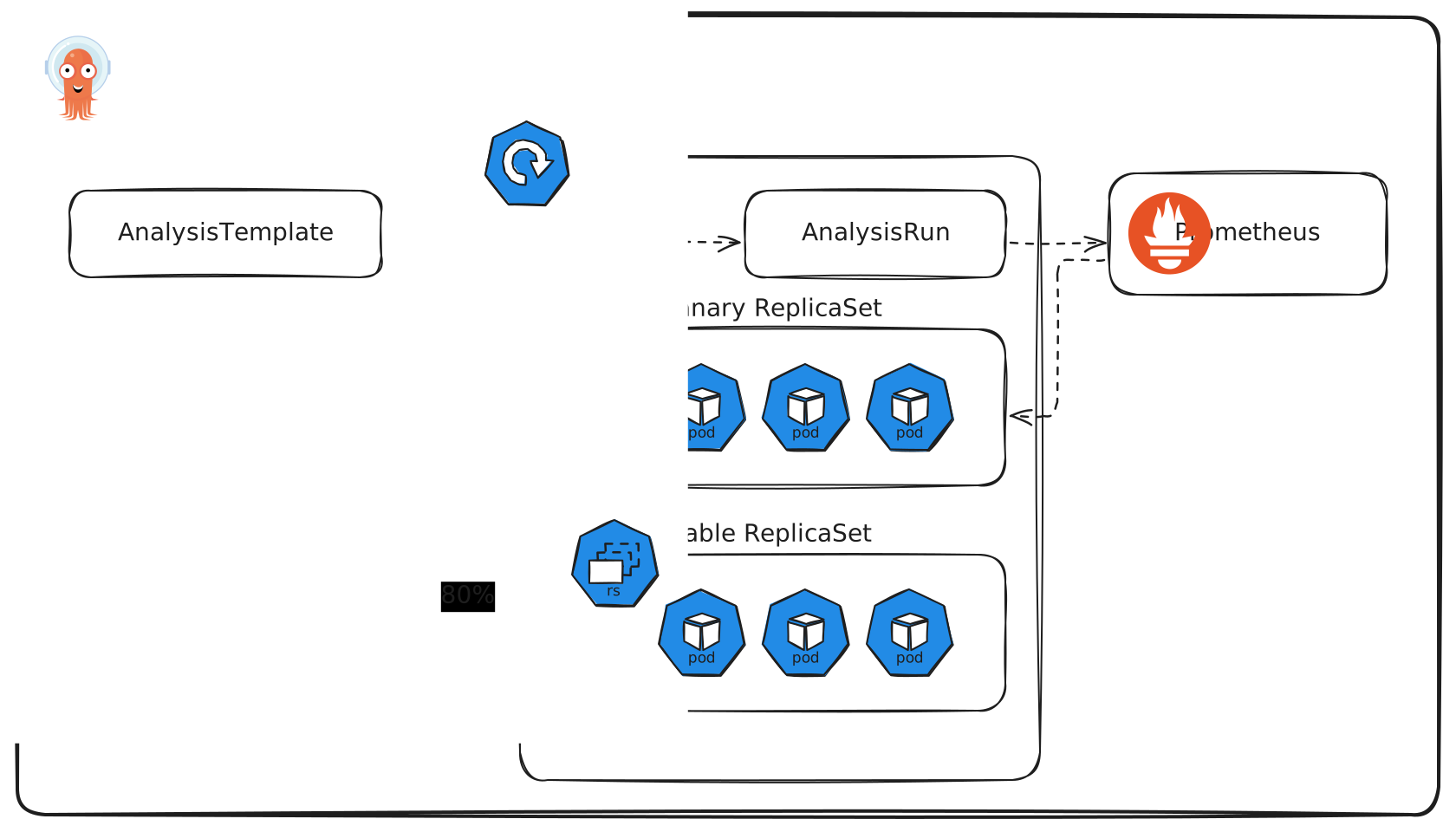
Argo Rollouts Components
-
Argo Rollouts Controller: An operator that manages Argo Rollout Resources. It reads all the details of a rollout (and other resources) and ensures the desired cluster state.
-
Argo Rollout Resource: A custom Kubernetes resource managed by the Argo Rollouts Controller. It is largely compatible with the native Kubernetes Deployment resource, adding additional fields that manage the stages, thresholds, and techniques of sophisticated deployment strategies, including canary and blue-green deployments.
-
Ingress and the Gateway API: The Kubernetes Ingress resource is used to enable traffic management for various traffic providers such as service meshes (e.g., Istio or Linkerd) or Ingress Controllers (e.g., Nginx Ingress Controller).
The Kubernetes Gateway API is also supported with a separate plugin and provides similar functionality.
-
Service: Argo Rollouts utilizes the Kubernetes Service resource to redirect ingress traffic to the respective workload version by adding specific metadata to a Service.
-
ReplicaSet: Standard Kubernetes ReplicaSet resource used by Argo Rollouts to keep track of different versions of an application deployment.
-
AnalysisTemplate and AnalysisRun: Analysis is an optional feature of Argo Rollouts and enables the connection of Rollouts to a monitoring system. This allows automation of promotions and rollbacks. To perform an analysis an AnalysisTemplate defines a metric query and their expected result. If the query matches the expectation, a Rollout will progress or rollback automatically, if it doesn’t. An AnalysisRuns is an instantiation of an AnalysisTemplate (similar to Kubernetes Jobs).
-
Metric Providers: Metric providers can be used to automate promotions or rollbacks of a rollout. Argo Rollouts provides native integration for popular metric providers such as Prometheus and other monitoring systems.
Please note, that not all of the mentioned components are mandatory to every Argo Rollouts setup. The usage of Analysis resources or metric providers is entirely optional and relevant for more advanced use cases. Also note that the Argo Rollouts components are independent of other Argo projects (like Argo CD or Argo Workflows) and do not require them to function properly.
Argo Rollouts Here, we will explore the Argo Rollouts resource, which is the central element in Argo Rollouts, enabling advanced deployment strategies. A Rollout, in essence, is a Kubernetes resource that closely mirrors the functionality of a Kubernetes Deployment object. However, it steps in as a more advanced substitute for Deployment objects, particularly in scenarios demanding intricate deployment of progressive delivery techniques.
Key Features of Argo Rollouts
Argo Rollouts outshine regular Kubernetes Deployments with several enhanced features.
Argo Rollouts Functionalities:
-
Blue-green deployments: This approach minimizes downtime and risk by switching traffic between two versions of the application.
-
Canary deployments: Gradually roll out changes to a subset of users to ensure stability before full deployment.
-
Advanced traffic routing: Integrates seamlessly with ingress controllers and service meshes, facilitating sophisticated traffic management.
-
Integration with metric providers: Offers analytical insights for blue-green and canary deployments, enabling informed decisions.
-
Automated decision making: Automatically promote or roll back deployments based on the success or failure of defined metrics.
The Rollout resource is a custom Kubernetes resource introduced and managed by the Argo Rollouts Controller. This Kubernetes controller monitors resources of type Rollout and ensures that the described state will be reflected in the cluster.
The Rollout resource maintains high compatibility with the conventional Kubernetes Deployment resource but is augmented with additional fields. These fields are instrumental in governing the phases, thresholds, and methodologies of advanced deployment approaches, such as canary and blue-green strategies.
It’s crucial to understand that the Argo Rollouts controller is attuned exclusively to changes in Rollout resources. It remains inactive for standard deployment resources. Consequently, to use the Argo Rollouts for existing Deployments, a migration from traditional Deployments to Rollouts is required.
Overall, Deployment and Rollout resources look pretty similar. Refer to the following table to understand the minimal differences between both.
Installation Options
Standard Cluster-Wide Installation
Deploy Argo Rollouts
Create a namespace for Argo Rollouts using the following command:
kubectl create namespace argo-rollouts
Deploy Argo Rollouts using the quick start manifest:
kubectl apply -n argo-rollouts -f https://github.com/argoproj/argo-rollouts/releases/download/v1.8.3/install.yaml
This will install custom resource definitions as well as the Argo Rollouts controller.
During this course we use Argo Rollouts in version 1.8.3. We recommend using the same version to ensure consistent results.
Verify that Argo Rollouts is installed by running the following command:
kubectl get pods -n argo-rollouts
Restrictedn Namespace-Scoped Installation
Limité à un namespace
Deploy Argo Rollouts Namespace Scoped
Create a namespace for Argo Rollouts using the following command:
kubectl create namespace argo-rollouts
Deploy Argo Rollouts using the quick start manifest:
kubectl apply -n argo-rollouts -f https://github.com/argoproj/argo-rollouts/../v1.8.3/download/namespace-install.yaml
Admin de cluster requi pour installer les CRDs de rollout séparement
CLI Installation
Install Rollouts kubectl Plugin Unlike Argo CD and Argo Workflows, Argo Rollouts uses a kubectl plugin as its CLI client. Download the latest Argo Rollouts kubectl plugin version from https://github.com/argoproj/argo-rollouts/releases/latest/. On Ubuntu 24.04, you can install the CLI using the following commands: Copyright, The Linux Foundation 2025. All rights reserved. 2 LFS256-v11.07.2025 $ wget https://github.com/argoproj/argo-rollouts/releases/download/v1.8.3/kub ectl-argo-rollouts-linux-amd64 -O kubectl-argo-rollouts $ chmod +x kubectl-argo-rollouts $ sudo mv kubectl-argo-rollouts /usr/local/bin/ More detailed installation instructions can be found via the CLI installation documentation. This is also available in Mac, Linux and WSL Homebrew. Use the following command: brew install argoproj/tap/kubectl-argo-rollouts Verify that the argo CLI is installed correctly by running the following command: kubectl argo rollouts version
brew install argoproj/tap/kubectl-argo-rollouts
kubectl -n argo-rollouts get all
NAME                                 READY   STATUS    RESTARTS   AGE
pod/argo-rollouts-7858b65d86-bcbhq   1/1     Running   0          8m55s

NAME                            TYPE        CLUSTER-IP   EXTERNAL-IP   PORT(S)    AGE
service/argo-rollouts-metrics   ClusterIP   10.96.68.1   <none>        8090/TCP   8m55s

NAME                            READY   UP-TO-DATE   AVAILABLE   AGE
deployment.apps/argo-rollouts   1/1     1            1           8m55s

NAME                                       DESIRED   CURRENT   READY   AGE
replicaset.apps/argo-rollouts-7858b65d86   1         1         1       8m55s
A Primer on Progressive Delivery
Essentials of CI/CD and Progressive Delivery in Software Development
Continuous Integration (CI), Continuous Delivery (CD), and Progressive Delivery are key concepts in modern software development, particularly in the context of DevOps and agile practices. They represent different stages or approaches in the software release process. We will discuss them more in this chapter.
Continuous Integration
Continuous Integration is a development practice where developers frequently integrate their code into a shared repository, preferably several times daily. Each integration is then verified by an automated build and automated tests.
CI Features
-
Frequent code commits:
Encourage developers to often integrate their code into the main branch, reducing integration challenges. -
Automated tests:
Cover frequent code commits. Automatically running tests on the new code to ensure it integrates well with the existing codebase. This does not only include unit tests, but also any other higher-order testing method, such as integration- or end-to-end tests. -
Immediate problem detection:
Allows for quick detection and fixing of integration issues. -
Reduced integration problems:
Help to minimize the problems associated with integrating new code.
The main goal of CI is to provide rapid feedback so that if a defect is introduced into the code base, it is identified and corrected as soon as possible.
Once code is in our main branch, it is not deployed in production or even released. This is where the concept of Continuous Delivery comes into play.
Continuous Delivery
Continuous Delivery is an extension of CI, ensuring the software can be reliably released anytime. It involves the automation of the entire software release process.
-
CD Features:
-
Automated release process:
Every change that passes the automated tests can be released to production through an automated process. -
Reliable deployments:
Ensure that the software is always in a deployable state. -
Rapid release cycles:
Facilitate frequent and faster release cycles. -
Close collaboration between teams:
A close alignment between development, QA, and operations teams is required.
-
The objective of Continuous Delivery is to establish a process where software deployments become predictable, routine, and can be executed on demand.
Progressive Delivery
Progressive delivery is often described as an evolution of continuous delivery. It focuses on releasing updates of a product in a controlled and gradual manner, thereby reducing the risk of the release, typically coupling automation and metric analysis to drive the automated promotion or rollback of the update.
-
Progressive Delivery Features:
-
Canary releases: Gradually roll out the change to a small subset of users before rolling it out to the entire user base.
-
Feature flags: Control who gets to see what feature in the application, allowing for selective and targeted deployment.
-
Experiments & A/B testing: Test different versions of a feature with different segments of the user base.
-
Phased rollouts: Slowly roll out features to incrementally larger segments of the user base, monitoring and adjusting based on feedback.
-
The primary goal of Progressive Delivery is to reduce the risk associated with releasing new features and to enable faster iteration by getting early feedback from users.
Deployment Strategies / Deyployment and Release pattern
Every software system is different, and deploying complex systems oftentimes requires additional steps and checks. This is why different deployment strategies emerged over time to manage the process of deploying new software versions in a production environment.
These strategies are an integral part of DevOps practices, especially in the context of CI/CD workflows. The choice of a deployment strategy can significantly impact the availability, reliability, and user experience of a software application or software service.
On the following pages, we will present the four most important deployment strategies and discuss their impact on user experience during deployment:
- Recreate
- Rolling update
- Blue-green deployment
- Canary deployment
Recreate
Un déploiement Recreate supprime l’ancienne version de l’application avant de démarrer la nouvelle. Par conséquent, cela garantit que deux versions de l’application ne s’exécutent jamais en même temps, mais il y a un temps d’arrêt pendant le déploiement.
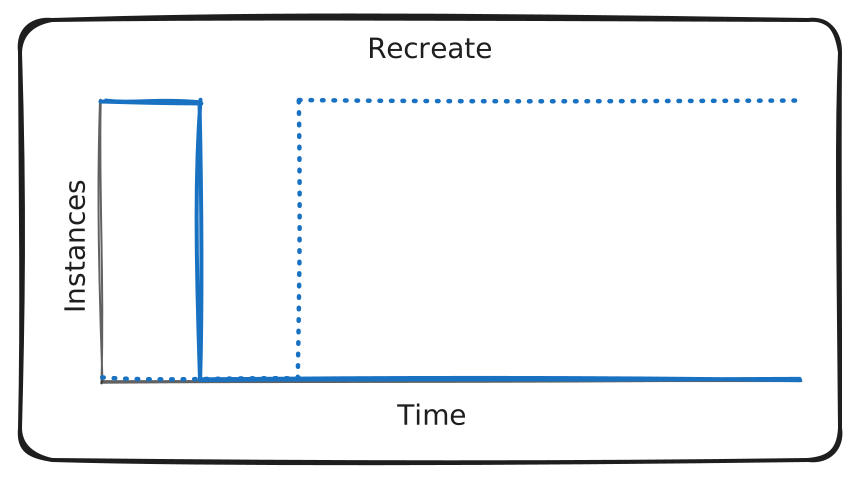
Cette stratégie est une option de l’objet Deployment de Kubernetes et convient aux environnements où un bref temps d’arrêt est acceptable ou lorsque la persistance de l’état n’est pas une préoccupation.
Rolling Update
Contexte
Vous devez déployer une nouvelle version de votre application sans pouvoir tolérer la moindre interruption de service. Cependant, lancer simultanément l’ensemble des nouveaux pods n’est pas envisageable, car cela risquerait de surcharger le cluster.
Il est donc nécessaire d’adopter une stratégie de déploiement progressive permettant de remplacer les anciennes versions par les nouvelles tout en maintenant la disponibilité et la stabilité du système.
Une Rolling Update remplace progressivement les pods exécutant l’ancienne version du container par de nouveaux pods exécutant la nouvelle version du container..
À mesure que la nouvelle version est mise en service, les anciens pods sont réduits afin de maintenir le nombre total d’instances de l’application, tout en surveillant la santé et la disponibilité du service après chaque étape.
Cela permet de réduire le temps d’arrêt et les risques, car la nouvelle version est déployée de manière contrôlée.
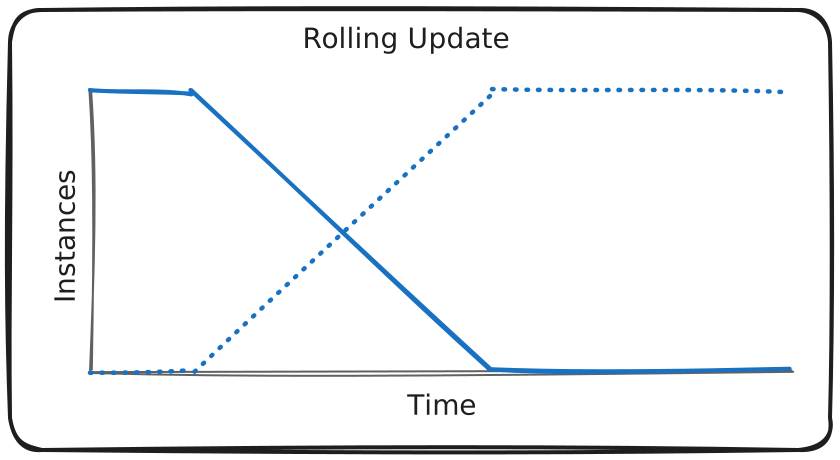
Cette approche garantit une perturbation minimale et une disponibilité continue de l’application. En cas de problème avec un nouveau pod, le rollout peut être mis en pause ou annulé.
Note
Rolling Update et la stratégie par défaut de l’objet Deployment de Kubernetes.
Kubernetes utilise les valeurs par défaut (25%)
Il n'est pas nécéssaire de rajouter une strategy dans l'objet Deployment par défault il utiliseras la configuration ci-dessous:
Tu n’es pas obligé de rajouter ça dans ton Deployment si tu veux juste le comportement par défaut.
  strategy:
    type: RollingUpdate
    rollingUpdate:
      maxSurge: 1
      maxUnavailable: 1
Voici pourquoi :
1️⃣ Comportement par défaut
Pour un Deployment Kubernetes, si tu ne précises pas de strategy :
strategy: type: RollingUpdate
C’est exactement le rolling update qui va se passer.
Les valeurs par défaut pour maxSurge et maxUnavailable sont :
maxSurge: 25% # jusqu’à 25% de pods en plus maxUnavailable: 25% # jusqu’à 25% de pods indisponibles
Donc pour ton Deployment avec replicas: 3 :
maxSurge: 25% → arrondi à 1 pod supplémentaire au maximum
maxUnavailable: 25% → arrondi à 0 ou 1 pod indisponible (Kubernetes arrondit à l’entier supérieur pour maxUnavailable)
2️⃣ Quand tu voudrais le mettre explicitement
Tu utiliserais :
strategy: type: RollingUpdate rollingUpdate: maxSurge: 1 maxUnavailable: 1
Ici tu contrôles exactement qu’au maximum 1 pod supplémentaire sera créé et qu’au maximum 1 pod peut être indisponible à la fois.
C’est utile si tu veux contrôler très finement le trafic ou si tu as des pods qui consomment beaucoup de ressources.
✅ Conclusion
Si tu es d’accord avec le comportement par défaut (Kubernetes fait un rolling update avec au maximum 1 pod sur 3 indisponible à la fois), tu n’as pas besoin de l’ajouter.
Ajouter cette section est juste pour plus de précision et contrôle, pas pour que ça fonctionne.
Si tu veux, je peux te montrer un petit tableau qui compare le comportement par défaut vs maxSurge/maxUnavailable explicites, ça rend tout super clair pour 3 pods. Veux que je fasse ça ?
maxSurge et maxUnavailable sont des pourcentage obligatoire ?
Non, ils ne sont pas obligatoirement des pourcentages, tu peux les spécifier en nombre absolu de pods. Kubernetes accepte les deux formats :
1️⃣ En pourcentage maxSurge: 25% # 25% des replicas, arrondi à l'entier supérieur maxUnavailable: 25% # idem
Pour ton Deployment de 3 pods :
25% → 0,75 → arrondi à 1 pod.
Avantage : ça s’adapte automatiquement si tu changes le nombre de replicas.
2️⃣ En nombre absolu maxSurge: 1 maxUnavailable: 1
Ici, Kubernetes prend exactement 1 pod, peu importe le nombre total de replicas.
Avantage : tu as un contrôle strict, utile pour des déploiements sensibles ou des petits clusters.
3️⃣ Important
Tu dois toujours mettre une valeur pour maxSurge et maxUnavailable si tu définis strategy: RollingUpdate.
Mais si tu ne définis pas strategy du tout, Kubernetes utilise les valeurs par défaut (25%), donc tu n’as rien à mettre.
GitOps: Le dev modifie dans le manifest de deployment la version de 1.0 à 2.0 et le push argo prendra en considération la modification et déploieras la nouvelle app selon les indication fournis dans la strategy
1 2 3 4 5 6 7 8 9 10 11 12 13 14 15 16 17 18 19 20 21 22 23 24 25 26 27 28 29 30 31 32 33 34 35 36 37 38 39 40 41 42 43 44 45 46 47 | |
- maxSurge
Nombre max (Pourcentage ou Absolue) de pods en plus pendant l'update - maxUnavailable
Nombre max (Pourcentage ou Absolue) de pods indisponibles pendant l'update
Pour déclencher un Rolling Update, tu modifies simplement l'image dans le Deployment :
# Via kubectl
kubectl set image deployment/example-app app=nginx:1.25

# Ou en éditant le manifest et en appliquant
kubectl apply -f deployment.yaml

# Suivre le status du rollout
kubectl rollout status deployment/example-app

# Voir l'historique
kubectl rollout history deployment/example-app

# Rollback si nécessaire
kubectl rollout undo deployment/example-app
Les points clés pour un Rolling Update efficace:
- Strategy configuration : Les paramètres maxSurge et maxUnavailable contrôlent la vitesse et la disponibilité pendant l'update
- Readiness/Liveness probes : Essentielles pour que Kubernetes sache quand un pod est prêt à recevoir du trafic
- Resources limits : Permet au scheduler de placer correctement les pods pendant l'update
Blue/Green
Canary Release
Direct Conversion Method
Migrating Existing Deployments to Rollouts The similarity of Deployments and Rollouts spec makes it easier to convert from one to the other resource type. Argo Rollouts supports a great way to migrate existing Deployment resources to Rollouts.
By providing a spec.workloadRef instead of spec.template a Rollout can refer to a Deployments template:
apiVersion: argoproj.io/v1alpha1 kind: Rollout metadata: name: nginx-rollout spec: replicas: 3 selector: matchLabels: app: nginx workloadRef: apiVersion: apps/v1 kind: Deployment name: nginx-deployment [...]
The Rollout will fetch the template information from the Deployment (in our example named nginx-deployment) and start the in the Rollout specified number of pods.
Please note, that lifecycles of Deployment and Rollouts are distinct and managed by their respective controllers. This means that the Kubernetes Deployment controller will not start to manage Pods created by the Rollout. Also, the Rollout will not start to manage pods that are controlled by the Deployment.
This enables a zero-downtime introduction of Argo Rollouts to your existing cluster. It furthermore makes experimentation with multiple deployment scenarios possible.
deployment.yaml Que fait Kubernetes exactement ?
- Kubernetes compare la nouvelle spec avec l’ancienne.
- Il voit que l’image a changé, donc il doit créer de nouveaux pods.
-
Le rolling update va fonctionner comme suit:b
- Kubernetes va créer un nouveau pod avec l’image green.
- Quand ce pod est Ready (liveness et readiness passent), il supprime un pod blue existant.
- Il répète ce processus jusqu’à ce que tous les pods soient remplacés par des pods green.
Donc le cycle est :
- 3 pods blue
- 3 pods blue → 1 pod green
- 2 pods blue → 2 pods green
- 1 pod blue → 3 pods green
- 3 pod green
Détails sur les pods:
- Les pods blue sont supprimés progressivement.
- Les pods green sont créés progressivement.
- Tu n’as jamais de downtime complet si tes pods sont correctement configurés avec readiness probes, car le Service continuera à router le trafic vers les pods Ready.
Deployment and Argo Rollout Resource in Comparison
| deployment.yaml | |
|---|---|
1 2 3 4 5 6 7 8 9 10 11 12 13 14 15 16 17 18 19 20 21 22 | |
| rollout.yaml | |
|---|---|
1 2 3 4 5 6 7 8 9 10 11 12 13 14 15 16 17 18 19 20 21 22 | |
Pros:
- Rollout adds advanced strategies like blue-green and canary
- Keeps the same pod template and replicas
- Traffic can be controlled via active/preview services
- Auto-promotion can be manual ou automatic
workloadRef Method
https://learn.kodekloud.com/user/courses/certified-argo-project-associate-capa/module/959dfde0-9415-4fc2-bcad-fe9e4bf84cc7/lesson/d363f5a0-40da-4442-9a84-91862257155e
| deployment.yaml | |
|---|---|
1 2 3 4 5 6 7 8 9 10 11 12 13 14 15 16 17 | |
| rollout.yaml | |
|---|---|
1 2 3 4 5 6 7 8 9 10 11 12 13 14 15 | |
https://argo-rollouts.readthedocs.io/en/stable/features/specification/
Discussion: Create Rollouts or Reference Deployments from Rollouts? As Rollout resources can exist and operate without vanilla Deployments, the following question might arise: Should I always reference Deployments or is it better to start over with an independent Rollout resource, without the dependency of a reference?
And the simple answer to it is… it depends.
Generally, workloadRef has been invented to enable a simple and seamless way of migrating from Deployments to Rollouts. We even consider it useful as Administrators who are unfamiliar with Argo Rollouts might be confused if they see an array of Pods running but neither a running Deployment nor StatefulSet. To lower the barrier, referencing existing Deployments from a Rollout can be a good option.
If you use Deployment referencing, the Argo controller will copy the generation number of the referenced Deployment and stores it in a status field called workloadObservedGeneration. Therefore the rollouts own rollout.argoproj.io/workload-generation annotation should always match the generation of the deployment. This helps to identify deviation due to manipulation of either of the resources.
However, referencing comes at the cost of another resource dependency. Yet another resource to check in case of failure!
So, if you are sure you want to work with Argo Rollouts, use the native Rollout Resource.
Hint: It is also possible to migrate a Rollout resource to a native Deployment. Please refer to the official documentation for further information.
Additional learning resources:
To explore the detailed specification of a Rollout, visit Argo Rollouts Specification. For guidance on transitioning from a Deployment to a Rollout, consult Migrating a Deployment to Rollout.
Strategies for Smooth and Reliable Releases
In summary, deployment strategies are fundamental in modern software development and operations for ensuring smooth, safe, and efficient software releases. They cater to the need for balancing rapid deployment with the stability and reliability of production environments.
Benefits of Introducing Deployment Strategies
| Benefit | Description |
|---|---|
| Risk mitigation | - They allow for safer deployments by reducing the risk of introducing bugs or performance issues into the production environment. - Strategies like canary deployments enable gradual exposure to new changes. |
| User experience | - Maintaining a consistent and high-quality user experience is essential. - Strategies like blue-green deployments minimize downtime and potential disruptions to the user experience. |
| Feedback and testing | - They provide a framework for gathering real-world user feedback. - Canary deployments, in particular, are valuable for understanding how changes perform in a live environment. |
| Rollback capabilities | - In case new versions have critical issues, strategies like blue-green deployments allow for quick rollbacks to the previous stable version. |
Common Use Cases for Each Strategy
| Strategy | Supported By | Common Use Cases |
|---|---|---|
| Fixed deployment | Kubernetes Native | - The most basic way to deploy a workload is whenever downtime is acceptable. - Often stateful workloads (e.g., Databases) require a “recreation” to avoid data corruption. |
| Rolling update | Kubernetes Native | - Commonly used for stateless, low-maintenance workloads like proxies, RESTful APIs, etc. |
| Blue-green deployment | Argo Rollouts | - Use when a) you can afford the extra cost of running twice the resources and b) need a quick and easy rollback option. - B/G can also be helpful for experimentation scenarios. - Can be advantageous to update services that depend on stateful connections, e.g., via WebSockets. |
| Canary deployment | Argo Rollouts | - Use it whenever a partial rollout is desirable (experimentation with a subset of users, desire a gradual rollout over hours or days, want to make rollout dependent on certain conditions). - It can be a good alternative if the deployments are too large and the infra cost of running a full blue-green is too high. |
Rollout Analysis & Experiments
The ability to split traffic between stable and canary workloads is good. But how do we decide if the canary workload is performing well and is therefore considered "stable"? That's right, metrics! An operator would closely observe the monitoring system (e.g., Prometheus, VMWare Wavefront or others) for certain metrics that indicate the application is working well. If you're thinking that this "observing metrics and making a decision" could be automated, you're right!
Argo Rollouts allows the user to run “Analysis” during the progressive delivery process. It primarily focuses on evaluating and ensuring the success of deployment based on defined criteria. These criteria can include custom metrics of your specific metric monitoring provider (see the official documentation for a conclusive list of supported metric providers).
The analysis process in Argo Rollouts involves following custom resources that work hand in hand with the already discussed resources.
Table 5.4: Analysis Custom Resource Definitions
| Templates | Description/Use Case |
|---|---|
AnalysisTemplate |
This template defines the metrics to be queried and the conditions for success or failure. The AnalysisTemplate specifies what metrics should be monitored and the thresholds for determining the success or failure of a deployment. It can be parameterized with input values to make it more dynamic and adaptable to different situations. |
AnalysisRun |
An AnalysisRun is an instantiation of an AnalysisTemplate. It is a Kubernetes resource that behaves similarly to a job in that it runs to completion. The outcome of an AnalysisRun can be successful, failed, or inconclusive, and this result directly impacts the progression of the Rollout's update. If the AnalysisRun is successful, the update continues; if it fails, the update is aborted; and if it's inconclusive, the update is paused. |
Analysis resources allow Argo Rollouts to make informed decisions during the deployment process, like promoting a new version, rolling back to a previous version, or pausing the rollout for further investigation based on real-time data and predefined success criteria.
AnalysisRuns support various providers like Prometheus or multiple other monitoring solutions to obtain measurements for analysis. Those measurements can then be used to automate promotion decisions.
Besides just looking at metrics, there are other ways to decide if your rollout is doing well. The most basic (but commonly used) one might be the Kubernetes “Job” provider: if a job is successful, the metric is considered “successful". If the job returns with anything else than return code zero, the metric is considered “failed”.
The Web provider helps with seamless integration to custom services to help make promotion decisions.
Remember, it's not mandatory to use analysis and metrics when you're rolling out updates in Argo Rollouts.
If you want, you can control the rollout yourself. This means you can stop or advance the rollout whenever you choose. You can do this through the API or the command line. Also, you don't have to rely on automatic metrics for using Argo Rollouts. It's totally fine to combine automatic steps, like those based on analysis, with your own manual steps.
Experiments
Experiments are an extended feature of Argo Rollouts designed to test and evaluate changes in two or more versions of an application in a controlled, temporary environment. The Experiment custom resource can launch AnalysisRuns alongside ReplicaSets. This is useful to confirm that new ReplicaSets are running as expected.
You can use experiments in Argo Rollouts to test different versions of your app at the same time. This is like doing A/B/C testing. You can set up each experiment with its own version of the app to see which one works best. Each experiment uses a template to define its specific version of the app.
The great thing about these experiments is that you can run several of them simultaneously, and each one is separate from the others. This means they don't interfere with each other.
To learn more about Analysis or Experiments, please consult the official documentation.
Lab exercices
Lab - Installing Argo Rollouts
Objective
Set up a local Kubernetes cluster using Kind, install Argo Rollouts, and understand how to access Argo Rollout resources.
Prerequisites
- Basic understanding of Docker, Kubernetes, and command-line interface operations.
- Access to a computer with an internet connection.
- An installation of Kubernetes that you have full control over
- See Chapter 2’s Deploying Kubernetes for Argo section for details on how to set one up for yourself
Install Cluster and Argo Rollouts
NOTE: Steps 1-4 might not be necessary if you already followed the setup during a previous chapter.
-
Installing Docker Ensure Docker is installed and running on your machine. ● Installation instructions can be found on the Docker website.
-
Installing Kind Download and install Kind following the instructions from the Kind official website.
-
Creating a Kubernetes Cluster with Kind Create a cluster by running the following command:
kind create cluster
kind-kind.
-
Installing kubectl Instructions for downloading kubectl can be found in the Kubernetes official documentation.
-
Deploy Argo Rollouts Create a namespace for Argo Rollouts using the following command:
kubectl create namespace argo-rollouts
Deploy Argo Rollouts using the quick start manifest:
kubectl apply -n argo-rollouts -f https://github.com/argoproj/argo-rollouts/releases/download/v1.8.3/install.yaml
This will install custom resource definitions as well as the Argo Rollouts controller. During this course we use Argo Rollouts in version 1.8.3. We recommend using the same version to ensure consistent results.
Verify that Argo Rollouts is installed by running the following command:
kubectl get pods -n argo-rollouts
- Install Rollouts kubectl Plugin
Unlike Argo CD and Argo Workflows, Argo Rollouts uses a kubectl plugin as its CLI client. Download the latest Argo Rollouts kubectl plugin version from
https://github.com/argoproj/argo-rollouts/releases/latest/.
On Ubuntu 24.04, you can install the CLI using the following commands:
wget https://github.com/argoproj/argo-rollouts/releases/download/v1.8.3/kubectl-argo-rollouts-linux-amd64 -O kubectl-argo-rollouts
chmod +x kubectl-argo-rollouts
sudo mv kubectl-argo-rollouts /usr/local/bin/
More detailed installation instructions can be found via the CLI installation documentation.
This is also available in Mac, Linux and WSL Homebrew. Use the following command:
brew install argoproj/tap/kubectl-argo-rollouts
Verify that the argo CLI is installed correctly by running the following command:
kubectl argo rollouts version
- UI Dashboard For the sake of completeness it needs to be mentioned that Argo Rollouts ships with a fully fledged UI Dashboard. It can be accessed via the kubectl argo rollouts dashboard command and provides a nice overview and basic commands for administration.
kubectl argo rollouts dashboard
Output:
INFO[0000] Argo Rollouts Dashboard is now available at
http://localhost:3100/rollouts
INFO[0000] [core] [Channel #1 SubChannel #2]grpc:
addrConn.createTransport failed to connect to {Addr: "0.0.0.0:3100",
ServerName: "0.0.0.0:3100", }. Err: connection error: desc =
"transport: Error while dialing: dial tcp 0.0.0.0:3100: connect:
connection refused"
Despite any “connection refused” errors, you can now access it via the UI at http://localhost:3100 or your VM’s public IP address at port 3100.
As the Dashboard is self-explanatory, we will not discuss it in detail during this course. The Argo Rollouts Dashboard displaying a sample app “rollout-bluegreen” NOTE: If no rollout resources are in place, the dashboard will display “Loading…”.
-
Optional: Shell Auto-Completion To get easy access to Argo Rollout resources, the CLI can add shell completion code for several shells. For bash, you can use the following command: source <(kubectl-argo-rollouts completion bash) Other shells are supported as well. Please refer to the completion command documentation for more details.
-
Using Argo Rollouts There are a wide variety of commands that you can use to control Argo Rollouts via the CLI, as described in the -h output for the kubectl argo rollouts command. As a kubectl plugin, it uses the Kubernetes API to perform all management tasks. Here is a list of the most common commands to operate with Argo Rollouts:
kubectl get rollout
kubectl argo rollouts get rollout
kubectl argo rollouts promote
kubectl argo rollouts undo
Lab - Argo Rollouts Blue-Green
Let’s dig into it by creating a blue-green deployment scenario. It enables us to verify a version upgrade before the live traffic hits our service. It is easy to understand and therefore one of the most commonly used ways to roll out new versions of software without any downtime. Objective This lab aims to give a reader an idea of the “look and feel” of Argo Rollouts. It will demonstrate how to realize a simple blue-green scenario with Argo Rollouts. As blue-green is the most basic deployment pattern that rollout supports, this is a great introduction to the fundamental functionality of Argo Rollouts. Prerequisites ● Kubernetes cluster with the argo-rollouts controller ● kubectl with the argo-rollouts plugin (optional) Creating Blue-Green Deployments with Argo Rollouts 1. Install Resources For the beginning, let’s check for existing rollouts using this command: $ kubectl get rollout Output: No resources found in default namespace. As expected, there are no rollouts (yet) to be found in our cluster. Let's create one with the following command:
cat <<EOF | kubectl apply -f - apiVersion: argoproj.io/v1alpha1 kind: Rollout metadata: name: rollout-bluegreen spec: replicas: 2 revisionHistoryLimit: 2 selector: matchLabels: app: rollout-bluegreen template: metadata: labels: app: rollout-bluegreen spec: containers: - name: rollouts-demo image: argoproj/rollouts-demo:blue imagePullPolicy: Always ports: - containerPort: 8080 strategy: blueGreen: activeService: rollout-bluegreen-active previewService: rollout-bluegreen-preview autoPromotionEnabled: false EOF Output: rollout.argoproj.io/rollout-bluegreen created Check whether the Rollout resource has been created running the command below: $ kubectl get rollout Output: NAME DESIRED CURRENT UP-TO-DATE AVAILABLE AGE rollout-bluegreen 2 75s It has been created, but is not ready yet. Let’s explore the reasons behind using the Argo Rollouts kubectl plugin to see if we can better understand its functionality.
The plugin enables us to get status information of a specific rollout and can be queried in the
form: kubectl argo rollouts get ro
metadata: creationTimestamp: null labels: app: rollout-bluegreen-active name: rollout-bluegreen-active spec: ports: - name: "80" port: 80 protocol: TCP targetPort: 80 selector: app: rollout-bluegreen type: ClusterIP status: loadBalancer: {} EOF As mentioned, the rollouts resource references a second service. A so-called “preview” service. A preview service enables a preview stack to be reachable by an administrator. It does so without serving public traffic. If we want the preview to go live, we need to "promote" the rollout. "Promotion" refers to setting a service live. Therefore, we will create a preview service resource to be able to check our application before promotion (aka setting it live). Run the command below: cat <<EOF | kubectl apply -f - apiVersion: v1 kind: Service metadata: creationTimestamp: null labels: app: rollout-bluegreen-preview name: rollout-bluegreen-preview spec: ports: - name: "80" port: 80 protocol: TCP targetPort: 80 selector: app: rollout-bluegreen type: ClusterIP
status: loadBalancer: {} EOF If we now check our rollout, we will eventually see a Healthy status. Run the command below: $ kubectl argo rollouts get ro rollout-bluegreen Output: Name: rollout-bluegreen Namespace: default Status: ✔ Healthy Strategy: BlueGreen Images: argoproj/rollouts-demo:blue (stable, active) Replicas: Desired: 2 Current: 2 Updated: 2 Ready: 2 Available: 2 NAME KIND STATUS AGE INFO ⟳ rollout-bluegreen Rollout ✔ Healthy 50s └──# revision:1 └──⧉ rollout-bluegreen-5ffd47b8d4 ReplicaSet ✔ Healthy 14s stable,active ├──□ rollout-bluegreen-5ffd47b8d4-mqc25 Pod ✔ Running 4s ready:1/1 └──□ rollout-bluegreen-5ffd47b8d4-q4bgf Pod ✔ Running 3s ready:1/1 2. Perform an Upgrade Now that we have a running application, let's try to perform a version upgrade using the blue-green method. Therefore, we’ll adjust our image to deploy argoproj/rollouts-demo:green instead of blue. Run the command below: cat <<EOF | kubectl apply -f - apiVersion: argoproj.io/v1alpha1 kind: Rollout metadata: name: rollout-bluegreen
spec: replicas: 2 revisionHistoryLimit: 2 selector: matchLabels: app: rollout-bluegreen template: metadata: labels: app: rollout-bluegreen spec: containers: - name: rollouts-demo image: argoproj/rollouts-demo:green imagePullPolicy: Always ports: - containerPort: 8080 strategy: blueGreen: activeService: rollout-bluegreen-active previewService: rollout-bluegreen-preview autoPromotionEnabled: false EOF The Rollout status moves from “Healthy” to “Paused”, indicating that a rollout is in progress and waits for further action. Please note, that we explicitly set autoPromotionEnabled to false - we can skip the pausing phase and directly promote by setting this value to true. Run the command below: $ kubectl argo rollouts get ro rollout-bluegreen Output: Name: rollout-bluegreen Namespace: default Status: ॥ Paused Message: BlueGreenPause Strategy: BlueGreen Images: argoproj/rollouts-demo:blue (stable, active) argoproj/rollouts-demo:green (preview) Replicas: Desired: 2 Current: 4 Updated: 2
Ready: 2 Available: 2 NAME KIND STATUS AGE INFO ⟳ rollout-bluegreen Rollout ॥ Paused 91s ├──# revision:2 │ └──⧉ rollout-bluegreen-75695867f ReplicaSet ✔ Healthy 6s preview │ ├──□ rollout-bluegreen-75695867f-m6pxh Pod ✔ Running 6s ready:1/1 │ └──□ rollout-bluegreen-75695867f-nr2rh Pod ✔ Running 6s ready:1/1 └──# revision:1 └──⧉ rollout-bluegreen-5ffd47b8d4 ReplicaSet ✔ Healthy 55s stable,active ├──□ rollout-bluegreen-5ffd47b8d4-mqc25 Pod ✔ Running 45s ready:1/1 └──□ rollout-bluegreen-5ffd47b8d4-q4bgf Pod ✔ Running 44s ready:1/1 Let's investigate the rollout a little further and check replicasets with the command below: $ kubectl get replicaset Output: NAME DESIRED CURRENT READY AGE rollout-bluegreen-5ffd47b8d4 2 2 2 80s rollout-bluegreen-75695867f 2 2 2 31s Argo rollout created a second replicaset, which is used to manage the different pod versions. Lets promote the new version.
Command:
kubectl argo rollouts promote rollout-bluegreen
rollout 'rollout-bluegreen' promoted
Command:
kubectl argo rollouts get ro rollout-bluegreen
Output: Name: rollout-bluegreen Namespace: default Status: ✔ Healthy Strategy: BlueGreen Images: argoproj/rollouts-demo:green (stable, active) Replicas: Desired: 2 Current: 2 Updated: 2 Ready: 2 Available: 2 NAME KIND STATUS AGE INFO ⟳ rollout-bluegreen Rollout ✔ Healthy 2m40s ├──# revision:2 │ └──⧉ rollout-bluegreen-75695867f ReplicaSet ✔ Healthy 75s stable,active │ ├──□ rollout-bluegreen-75695867f-m6pxh Pod ✔ Running 75s ready:1/1 │ └──□ rollout-bluegreen-75695867f-nr2rh Pod ✔ Running 75s ready:1/1 └──# revision:1 └──⧉ rollout-bluegreen-5ffd47b8d4 ReplicaSet • ScaledDown 2m4s ├──□ rollout-bluegreen-5ffd47b8d4-mqc25 Pod ◌ Terminating 114s ready:1/1 └──□ rollout-bluegreen-5ffd47b8d4-q4bgf Pod ◌ Terminating 113s ready:1/1 Our new revision changed from “preview” to “stable,active” - indicating that the new revision is live. You may also see that the first revision will display “delay” followed by a counter. Eventually, it will go into a “ScaledDown” status. We can even see this by checking our service with the command below: $ kubectl describe svc rollout-bluegreen-active Output:
Name: rollout-bluegreen-active
Namespace: default
Labels: app=rollout-bluegreen-active
Annotations:
argo-rollouts.argoproj.io/managed-by-rollouts: rollout-bluegreen
Selector:
app=rollout-bluegreen,rollouts-pod-template-hash=75695867f
Type: ClusterIP
IP Family Policy: SingleStack
IP Families: IPv4
IP: 10.96.227.100
IPs: 10.96.227.100
Port: 80 80/TCP
TargetPort: 80/TCP
Endpoints: 10.244.0.43:80,10.244.0.44:80
Session Affinity: None
Internal Traffic Policy: Cluster
Events:
Command:
kubectl argo rollouts undo rollout-bluegreen
rollout 'rollout-bluegreen' undo
Command:
kubectl argo rollouts get ro rollout-bluegreen
Output:
Name: rollout-bluegreen Namespace: default Status: ॥ Paused Message: BlueGreenPause Strategy: BlueGreen
Images: argoproj/rollouts-demo:blue (preview) argoproj/rollouts-demo:green (stable, active) Replicas: Desired: 2 Current: 4 Updated: 2 Ready: 2 Available: 2 NAME KIND STATUS AGE INFO ⟳ rollout-bluegreen Rollout ॥ Paused 3m52s ├──# revision:3 │ └──⧉ rollout-bluegreen-5ffd47b8d4 ReplicaSet ✔ Healthy 3m16s preview │ ├──□ rollout-bluegreen-5ffd47b8d4-2lvcq Pod ✔ Running 3s ready:1/1 │ └──□ rollout-bluegreen-5ffd47b8d4-k8sqf Pod ✔ Running 3s ready:1/1 └──# revision:2 └──⧉ rollout-bluegreen-75695867f ReplicaSet ✔ Healthy 2m27s stable,active ├──□ rollout-bluegreen-75695867f-m6pxh Pod ✔ Running 2m27s ready:1/1 └──□ rollout-bluegreen-75695867f-nr2rh Pod ✔ Running 2m27s ready:1/1 Note, that “undo” alone did not set the blue image active. The rollout is now again in the pausing phase, waiting for promotion of the rollout. Run the following command: $ kubectl argo rollouts promote rollout-bluegreen Output: rollout 'rollout-bluegreen' promoted Checking our rollout and active service once again, we see, that the selector changed back to our old ReplicaSet. Command: $ kubectl argo rollouts get ro rollout-bluegreen Output:
Name: rollout-bluegreen Namespace: default Status: ✔ Healthy Strategy: BlueGreen Images: argoproj/rollouts-demo:blue (stable, active) argoproj/rollouts-demo:green Replicas: Desired: 2 Current: 4 Updated: 2 Ready: 2 Available: 2 NAME KIND STATUS AGE INFO ⟳ rollout-bluegreen Rollout ✔ Healthy 4m17s ├──# revision:3 │ └──⧉ rollout-bluegreen-5ffd47b8d4 ReplicaSet ✔ Healthy 3m41s stable,active │ ├──□ rollout-bluegreen-5ffd47b8d4-2lvcq Pod ✔ Running 28s ready:1/1 │ └──□ rollout-bluegreen-5ffd47b8d4-k8sqf Pod ✔ Running 28s ready:1/1 └──# revision:2 └──⧉ rollout-bluegreen-75695867f ReplicaSet ✔ Healthy 2m52s delay:23s ├──□ rollout-bluegreen-75695867f-m6pxh Pod ✔ Running 2m52s ready:1/1 └──□ rollout-bluegreen-75695867f-nr2rh Pod ✔ Running 2m52s ready:1/1
Command:
kubectl describe svc rollout-bluegreen-active
Output:
Name: rollout-bluegreen-active Namespace: default Labels: app=rollout-bluegreen-active Annotations: argo-rollouts.argoproj.io/managed-by-rollouts: rollout-bluegreen Selector: app=rollout-bluegreen,rollouts-pod-template-hash=5ffd47b8d4
Type: ClusterIP
IP Family Policy: SingleStack
IP Families: IPv4
IP: 10.96.227.100
IPs: 10.96.227.100
Port: 80 80/TCP
TargetPort: 80/TCP
Endpoints: 10.244.0.45:80,10.244.0.46:80
Session Affinity: None
Internal Traffic Policy: Cluster
Events:
- Clean Up Resources We successfully used the blue-green deployment pattern to deploy an application and even performed a rollback. To keep our working cluster nice and clean, we are going to clean up resources we created.
Command:
kubectl delete rollout rollout-bluegreen
Output:
rollout.argoproj.io "rollout-bluegreen" deleted
Command:
kubectl delete svc rollout-bluegreen-active
Output:
rollout-bluegreen-preview
service "rollout-bluegreen-active" deleted
service "rollout-bluegreen-preview" deleted
Lab - Migrating an Existing Deployment to Argo Rollouts
Chances are, that you are not starting with a fresh Kubernetes installation but already have a running cluster with deployed workloads. Argo Rollouts has this scenario in mind and provides a migration path to migrate Deployments to Rollout resources.
Objective
Migrate a vanilla Kubernetes Deployment to an Argo Rollout resource.
Prerequisites
- Kubernetes cluster with an argo-rollouts controller.
- kubectl with an argo-rollouts plugin (optional).
Transitioning to Argo Rollouts
- Preparing resources
For this lab, we will create an NGINX deployment—a task you may have already undertaken numerous times.
Run the command below:
kubectl create deploy nginx-deployment --image=nginx --replicas=3
deployment.apps/nginx-deployment created
Now check our running pods and deployments using the following command:
kubectl get pods,deployment
NAME                                    READY   STATUS    RESTARTS   AGE
pod/nginx-deployment-6ff797d4c9-ftwcc   1/1     Running   0          57s
pod/nginx-deployment-6ff797d4c9-nbxf5   1/1     Running   0          57s
pod/nginx-deployment-6ff797d4c9-pw2cl   1/1     Running   0          57s

NAME                               READY   UP-TO-DATE   AVAILABLE   AGE
deployment.apps/nginx-deployment   3/3     3            3           58s
- Convert Deployment to Rollout Now we want to use the deployment definition to reference it in a new rollout. Run the command below:
cat <<EOF | kubectl apply -f -
apiVersion: argoproj.io/v1alpha1
kind: Rollout
metadata:
  name: nginx-rollout
spec:
  replicas: 3
  selector:
    matchLabels:
      app: nginx-deployment
  workloadRef:
    apiVersion: apps/v1
    kind: Deployment
    name: nginx-deployment
  strategy:
    canary:
      steps:
        - setWeight: 20
        - pause: {duration: 10s}
EOF

rollout.argoproj.io/nginx-rollout created
Note
The field workloadRef, which references the nginx-deployment resource.
As a result, we have 6 nginx instances running, 3 managed by our vanilla deployment, 3 by the newly created rollout.
Run the command below:
kubectl get rollout,deployment,pod
NAME                                DESIRED   CURRENT   UP-TO-DATE   AVAILABLE   AGE
rollout.argoproj.io/nginx-rollout   3         3         3            3           2m16s

NAME                               READY   UP-TO-DATE   AVAILABLE   AGE
deployment.apps/nginx-deployment   3/3     3            3           26m

NAME                                    READY   STATUS    RESTARTS   AGE
pod/nginx-deployment-6ff797d4c9-ftwcc   1/1     Running   0          26m
pod/nginx-deployment-6ff797d4c9-nbxf5   1/1     Running   0          26m
pod/nginx-deployment-6ff797d4c9-pw2cl   1/1     Running   0          26m
pod/nginx-rollout-6d7df6cfcb-bt78w      1/1     Running   0          2m16s
pod/nginx-rollout-6d7df6cfcb-z6srf      1/1     Running   0          2m16s
pod/nginx-rollout-6d7df6cfcb-zmm7v      1/1     Running   0          2m16s
- Scale Down Deployment To finish the migration, we now need to manually scale down the deployment. Run the following command:
kubectl scale deployment/nginx-deployment --replicas=0
Output:
kubectl get rollouts,deployments,pods
NAME                                DESIRED   CURRENT   UP-TO-DATE   AVAILABLE   AGE
rollout.argoproj.io/nginx-rollout   3         3         3            3           4m9s

NAME                               READY   UP-TO-DATE   AVAILABLE   AGE
deployment.apps/nginx-deployment   0/0     0            0           28m

NAME                                 READY   STATUS    RESTARTS   AGE
pod/nginx-rollout-6d7df6cfcb-bt78w   1/1     Running   0          4m9s
pod/nginx-rollout-6d7df6cfcb-z6srf   1/1     Running   0          4m9s
pod/nginx-rollout-6d7df6cfcb-zmm7v   1/1     Running   0          4m9s
This leaves you with an up-and-running workload, managed by a rollout resource!
The step of scaling down the deployment once referenced by the Rollout resource can be taken over by the Argo Rollout controller. A special scaleDown parameter exists that enables administrators to specify how the deployment should be scaled down (never, onsuccess, progressively).
After confirming the deployment is scaled down, scale it up one more time with the following command:
kubectl scale deployment/nginx-deployment --replicas=3
And apply the following new rollout spec which includes the scaleDown parameter:
cat <<EOF | kubectl apply -f -
apiVersion: argoproj.io/v1alpha1
kind: Rollout
metadata:
  name: nginx-rollout
spec:
  replicas: 3
  selector:
    matchLabels:
      app: nginx-deployment
  workloadRef:
    apiVersion: apps/v1
    kind: Deployment
    name: nginx-deployment
    scaleDown: onsuccess
  strategy:
    canary:
      steps:
        - setWeight: 20
        - pause: {duration: 10s}
EOF
This will provide the same result as before, except this time there was no need for any manual intervention!
Command:
kubectl get rollouts,deployments,pods
NAME                                DESIRED   CURRENT   UP-TO-DATE   AVAILABLE   AGE
rollout.argoproj.io/nginx-rollout   3         3         3            3           126m

NAME                               READY   UP-TO-DATE   AVAILABLE   AGE
deployment.apps/nginx-deployment   0/0     0            0           150m

NAME                                 READY   STATUS    RESTARTS   AGE
pod/nginx-rollout-6d7df6cfcb-bt78w   1/1     Running   0          126m
pod/nginx-rollout-6d7df6cfcb-z6srf   1/1     Running   0          126m
pod/nginx-rollout-6d7df6cfcb-zmm7v   1/1     Running   0          126m
More details on the feature can be found on the Rollout Migration documentation page.
- Clean Up Resources Make sure to leave the cluster nice and clean.
Command:
$ kubectl delete rollout nginx-rollout
Output:
rollout.argoproj.io "nginx-rollout" deleted
Command:
$ kubectl delete deployment nginx-deployment
Output:
deployment.apps "nginx-deployment" deleted
Dashboard
L'erreur ERR_EMPTY_RESPONSE avec le message grpc: addrConn.createTransport failed est un problème connu. Voici comment le résoudre :
Solutions à essayer dans l'ordre :
1. Vérifier la version d'Argo Rollouts
D'abord, vérifie ta version :
kubectl argo rollouts version
Si tu es en v1.8.0, c'est probablement la cause - cette version a un bug critique qui casse le dashboard.
2. Utiliser le dashboard déployé dans le cluster (recommandé)
Au lieu d'utiliser kubectl argo rollouts dashboard, déploie le dashboard comme service dans Kubernetes :
# Si tu utilises Helm
helm upgrade --install argo-rollouts argo/argo-rollouts \
  --namespace argo-rollouts \
  --set dashboard.enabled=true

# Ou avec les manifests officiels
kubectl apply -n argo-rollouts -f https://github.com/argoproj/argo-rollouts/releases/latest/download/dashboard-install.yaml
Puis accède-y via port-forward :
kubectl port-forward -n argo-rollouts svc/argo-rollouts-dashboard 3100:3100
3. Créer un Rollout minimal
Le dashboard a besoin d'au moins un Rollout pour fonctionner correctement :
# test-rollout.yaml
apiVersion: argoproj.io/v1alpha1
kind: Rollout
metadata:
  name: test-rollout
  namespace: default
spec:
  replicas: 1
  selector:
    matchLabels:
      app: test
  template:
    metadata:
      labels:
        app: test
    spec:
      containers:
      - name: nginx
        image: nginx:alpine
        ports:
        - containerPort: 80
kubectl apply -f test-rollout.yaml
4. Essayer avec des options différentes
# Spécifier le namespace explicitement
kubectl argo rollouts dashboard -n default

# Ou essayer un autre port
kubectl argo rollouts dashboard --port 8080
5. Utiliser l'extension ArgoCD (si tu as ArgoCD)
C'est l'alternative la plus stable actuellement :
# Installer l'extension dans ArgoCD
kubectl apply -n argocd -f https://github.com/argoproj-labs/rollout-extension/releases/latest/download/install.yaml
L'extension ajoute un onglet "Rollouts" directement dans l'interface ArgoCD pour chaque application.
6. Debug avancé
Si rien ne fonctionne, vérifie les logs du controller :
# Logs du controller
kubectl logs -n argo-rollouts deployment/argo-rollouts

# Vérifier si les CRDs sont installés
kubectl get crd rollouts.argoproj.io
Solution temporaire si urgent
En attendant de résoudre le problème du dashboard, tu peux utiliser le CLI pour visualiser tes rollouts :
# Voir l'état d'un rollout
kubectl argo rollouts get rollout <nom-rollout> --watch

# Lister tous les rollouts
kubectl argo rollouts list rollouts -A
Le problème le plus probable dans ton cas est soit : 1. La v1.8.0 qui est cassée 2. Aucun Rollout n'existe dans le cluster 3. Le dashboard n'est pas déployé comme service dans le cluster
Tu peux me dire quelle version tu utilises et si tu as déjà des Rollouts ? Je pourrai t'aider plus précisément.
D'accord ! Je vais te préparer un process complet pour installer ArgoCD via Helm et ensuite ajouter l'extension Rollout selon la documentation du repo.
1. Installation d'ArgoCD via Helm
# Créer le namespace argocd
kubectl create namespace argocd

# Ajouter le repo Helm d'ArgoCD
helm repo add argo https://argoproj.github.io/argo-helm
helm repo update

# Créer un fichier values pour ArgoCD avec l'extension
cat > argocd-values.yaml <<EOF
server:
  extensions:
    enabled: true
    extensionList:
      - name: rollout-extension
        env:
          - name: EXTENSION_URL
            value: https://github.com/argoproj-labs/rollout-extension/releases/download/v0.3.7/extension.tar
EOF

# Installer ArgoCD avec l'extension
helm install argocd argo/argo-cd \
  --namespace argocd \
  --version 7.7.12 \
  --values argocd-values.yaml
2. Installation d'Argo Rollouts (nécessaire pour utiliser l'extension)
# Créer le namespace pour argo-rollouts
kubectl create namespace argo-rollouts

# Installer Argo Rollouts
kubectl apply -n argo-rollouts -f https://github.com/argoproj/argo-rollouts/releases/latest/download/install.yaml
3. Accès à l'interface ArgoCD
# Récupérer le mot de passe admin initial
kubectl -n argocd get secret argocd-initial-admin-secret -o jsonpath="{.data.password}" | base64 -d

# Port-forward pour accéder à l'interface (ou utilise ton LoadBalancer avec kind)
kubectl port-forward svc/argocd-server -n argocd 8080:443
4. Test de l'extension avec un Rollout exemple
# Déployer les exemples du getting started d'Argo Rollouts
kubectl apply -f https://raw.githubusercontent.com/argoproj/argo-rollouts/master/docs/getting-started/basic/rollout.yaml
kubectl apply -f https://raw.githubusercontent.com/argoproj/argo-rollouts/master/docs/getting-started/basic/service.yaml
Alternative : Si tu préfères configurer directement avec les volumes
Si la méthode avec server.extensions ne fonctionne pas, tu peux utiliser cette configuration alternative dans ton argocd-values.yaml :
server:
  initContainers:
    - name: rollout-extension
      image: quay.io/argoprojlabs/argocd-extension-installer:v0.0.8
      env:
      - name: EXTENSION_URL
        value: https://github.com/argoproj-labs/rollout-extension/releases/download/v0.3.7/extension.tar
      volumeMounts:
        - name: extensions
          mountPath: /tmp/extensions/
      securityContext:
        runAsUser: 1000
        allowPrivilegeEscalation: false
  volumeMounts:
    - name: extensions
      mountPath: /tmp/extensions/
  volumes:
    - name: extensions
      emptyDir: {}
Une fois tout installé, tu devrais voir l'onglet Rollout dans l'interface ArgoCD quand tu visualises une ressource de type Rollout !
Blue/Green - Initial Version
BG est une stratégie de publication d'application qui utilise deux environnement de production identiques
Blue qui est celui en ligne et Green qui est l'options de secours.
Specification
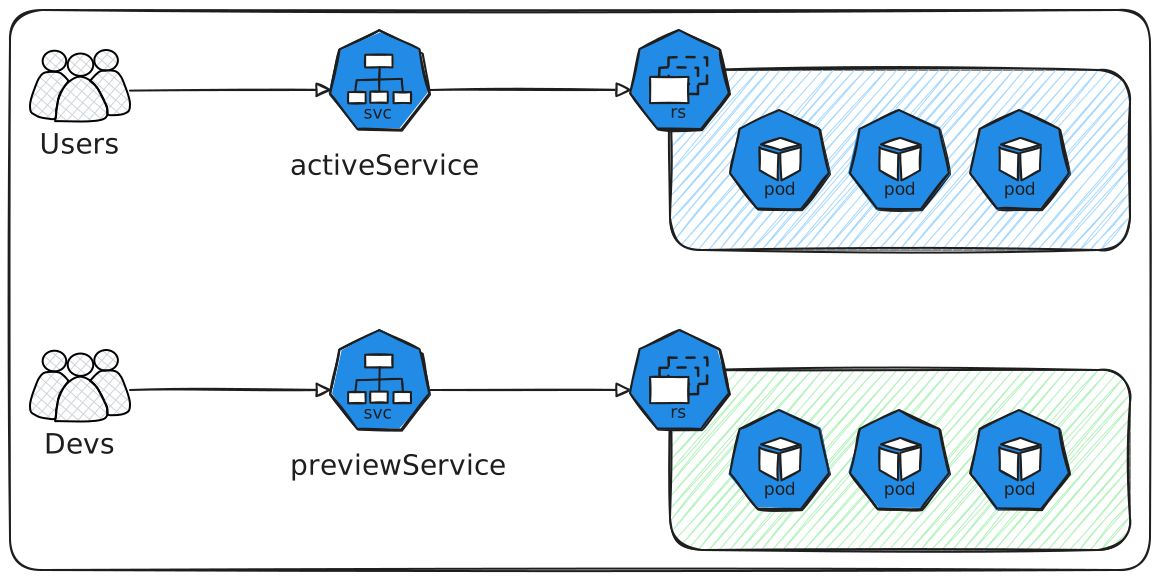
Deployer une nouvelle version green au cotés de la version blue stable et ensuite rediriger le trafic en direct vers elle seulement après qu'elle ait été entièrement vérifié
1 2 3 4 5 6 7 8 9 10 11 12 13 14 15 16 17 18 19 20 21 22 23 24 25 26 | |
activeService: est le service kubernetes principal pour le traffic de production en direct previewService: est un service interne séparer qui pointe toujours cers la nouvelle version Green cela fournit un point de terminaison stable pour les test automatisées et le QA manual avant que le trafic utilisateur ne soit affecté
previewReplicaCount: Cela va essentiellement déployer un nombre spécificié plus petit de réplicas pour la version Green durant la phase de prévisualisation afin de conserver les ressources du cluster tout en permettant des tests complets autoPromotionEnabled: Comme un interrupteur de sécurité critique. Le rollout déploie la version Green, mais ensuite il fait une pause et attend une approbation manuelle en utilisant kubectl ou une UI avant de charger le traffic. Par défaut si vous ne mentionnez pas cela, l'auto-promotion activées est toujorus vraie!
kubectl argo rollouts promote
postPromotionAnalysis: configurer pour exécuter une vérification de santé d'analyse automatisé comme interroger Prometheus après que la nouvelle version prenne 100% du traffic en direct pour s'assurer que les SLOs sont toujours respecter.
scaleDownDelaySecondes: C'est comme une fenêtres de rollback rapide. Après avoir redirige le traffic vers la nouvelle version Green, le controleur attend ce nombre de secondes avant de terminer les anciens pods bleus ce qui permet un rollback instantané si un problèmes est détecter.
abortScaleDownDelaySeconds: Pour annuler la reduction d'échèlle. Donc si le rollout est annulé manuellement, le controlleur attend ce nombre de secondes avant de terminer les pods vers défectueux. Ce bref délai permet au développeurs de collecter des logs ou des dumps de mémoire à des fin de débogage.
Demo blue green deployment
Canary
apiVersion: argoproj.io/v1alpha1
kind: Rollout
metadata:
  name: web-api-rollout
spec:
  replicas: 10
  selector:
    matchLabels:
      app: web-api
  template:
    metadata:
      labels:
        app: web-api
  spec:
    container:
    - name: web-api-container
      image: my-repo/web-api:v1
      ports:
      - containerPort: 8080
  strategy:
    canary:
      steps:
      - setWeight: 10
      - pause: {}
      - setWeight: 25
      - analysis:
          templates:
          - templateName: check-api-error-rate
          args:
          - name: service-name
            value: web-api-canary-svc
      - setWeight: 50
      - pause: { duration: 5m }
      canaryService: web-api-canary-svc # pointe 1.1
      stableService: web-api-stable-svc # pointe 1.0
| Feature | Blue/Green | Canary Deployment |
|---|---|---|
| Primary Goal | Zero Downtime full environment switch, rapid rollback | Reduce risk by gradual exposure. Real-user feedback |
| Environment | Two complete, identical environments (Blue & Green) | Single environment, with a small subset of new instances |
| Traffic Split | All-or-nothing (or very rapid) switch of all traffic | Gradual, weighted routing of portion of traffic |
| Rollback | Instantaneous switch back to the old "Blue" Environment | Revert traffic weight to 0% for the new version |
| Complexity | Can be simpler to set up initially, but resource-heavy (two full environments) | More complex to set up due to traffic routing (service mesh) |
| Feedback Loop | Feedback mostly gathered before the full traffic switch in Green | Continious, real-time feedback from a small user segment during rollout |
| Risk Reduction | Reduces risk of downtime, high confidence after green validation | Reduces "blast radius" of issues to a small subset of users |
| Resource Usage | Higher ( two full environments running simultaneously) | Lower (only a small percentage of new resources initially) |
| Best for | Applications sensitive to downtime, quick "go/no-go" decisions | Risk-averse releases, A/B testing, user behavior monitoring, unknown impatcs |