ARGO EVENTS
Event driven workflow automation framework for kubernetes
Event Sources
Webhooks AWS S3 AWS SQS/SNS Kafka NATS GCP Pub/Sub Schedules ...
EventSources Consumes & Transforms Events
Event Configuration CloudEvents Format
EventBus
NATS Streaming Pub/Sub System
sensor
Triggers
Event Sources > EventSource > EventBus > Sensor
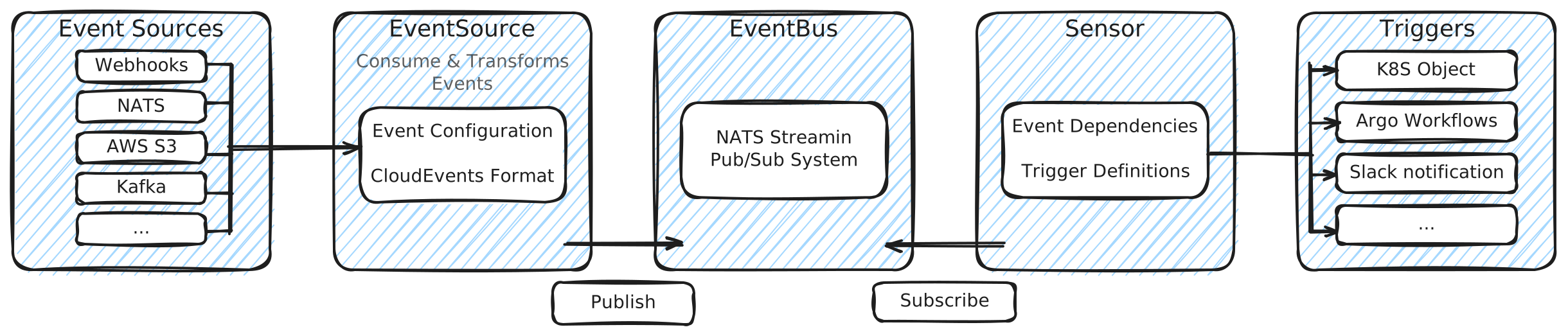
- EventSource: Publishes events
- EventBus: Acts as a central highway for all events
- EventSource: Subscribe to events
Argo Events utilise NATS streaming
(Utiliser JetStream à l'avenir)
Introduction
Chapter Overview and Objectives
In this chapter, we discuss Argo Events, exploring its role in implementing event-driven architecture within Kubernetes. Starting with a conceptual overview, we'll understand the key components of Argo Events—Event Sources, Sensors, EventBus, and Triggers, and their significance in Kubernetes. The chapter then transitions to practical learning, with labs focused on configuring event sources and triggers, and integrating Argo Events with external systems like webhooks and message queues.
By the end of this chapter, you should be able to:
- Learn how event sources initiate the event-driven process in Kubernetes.
- Understand the detection and response mechanism of sensors and triggers in event-driven systems.
- Grasp the importance of the EventBus in managing event flow within Argo Events.
The Main Components
Event-Driven Architecture
In this section, we explore the concept of event-driven architecture (EDA) and its practical application in Kubernetes environments. Unlike traditional architectures where components operate in a linear, request-response manner, EDA is based on a more dynamic and fluid model. This model is particularly relevant in Kubernetes, a system that manages containerized applications across clusters and thrives on responsiveness and adaptability.
At the core of Kubernetes are events - these are various actions or changes within the system, like pod lifecycle changes or service updates. EDA in Kubernetes involves responding to these events in a way that's both automated and scalable. This method of operation allows for a more efficient handling of the ever-changing state within a Kubernetes cluster.
Argo Events enters the picture as a tool designed for Kubernetes, aimed at facilitating the implementation of event-driven paradigms. It isn't just an add-on but rather an integration that amplifies Kubernetes' capabilities. Let's take a look at the main components of Argo Events.
Event Source: This is where events are generated. Event sources in Argo Events can be anything from a simple webhook or a message from a message queue, to a scheduled event. Understanding event sources is key to knowing how your system will interact with various external and internal stimuli. An example of an event source is provided below:
apiVersion: argoproj.io/v1alpha1 kind: EventSource metadata: name: webhook-example spec: service: ports: - port: 12000 targetPort: 12000 webhook: example-endpoint: endpoint: /example method: POST
Sensor: Sensors are the event listeners in Argo Events. They wait for specific events from the event sources and, upon detecting these events, trigger predefined actions. Understanding sensors involves knowing how to respond to different types of events. A sensor would be specified with the following spec:
apiVersion: argoproj.io/v1alpha1 kind: Sensor metadata: name: webhook-sensor spec: dependencies: - name: example-dep eventSourceName: webhook-example eventName: example-endpoint triggers: - template: name: k8s-trigger k8s: group: batch version: v1 resource: jobs operation: create source: resource: apiVersion: batch/v1 kind: Job metadata: generateName: webhook-job- spec: template: spec: containers: - name: hello image: busybox command: ["echo", "Hello from Argo Sensor!"] restartPolicy: Never
EventBus: The EventBus acts as a backbone for event distribution within Argo Events. It's responsible for managing the delivery of events from sources to sensors. Understanding the EventBus is crucial for managing the flow of events within your system.
apiVersion: argoproj.io/v1alpha1 kind: EventBus metadata: name: default spec: nats: native: replicas: 1
Trigger: Triggers in Argo Events are the mechanisms that respond to events detected by sensors. They can perform a wide range of actions, from starting a workflow to updating a resource. Understanding triggers is essential for automating responses to events. Triggers are defined within a sensor specification, so the following excerpt focuses on the trigger itself:
trigger: template: name: argo-workflow-trigger argoWorkflow: source: resource: apiVersion: argoproj.io/v1alpha1 kind: Workflow metadata: generateName: hello-world- spec: entrypoint: whalesay templates: - name: whalesay container: image: docker/whalesay:latest command: [cowsay] args: ["Hello from Argo Events!"]
Architecture of Argo Events
The image depicts the architecture of Argo Events, showing three main components: Event Source, Event Bus, and Sensor, each with a controller and deployment. The Event Source receives various events (like SNS, SQS, GCP PubSub, S3, Webhooks, etc.), which are managed by the Event Source Controller and passed on to the Event Source Deployment. This connects to the Event Bus with NATS Streaming through the Event Bus Controller. Finally, the Sensor Controller manages the Sensor Deployment, which triggers workflows in Kubernetes and functions in AWS Lambda, illustrated by respective icons.
Lab Exercises
Lab 6.1. Setting Up Event Triggers with Argo
Lab Tips and Best Practices When working on the lab exercises, please keep the following in mind:
When accessing external URLs embedded in the PDF document below, always use right-click and open in a new tab or window. Attempting to open the URL by directly clicking on it will close your course window/tab. Depending on your PDF viewer, if you are cutting and pasting from the document, you may lose the original formatting. For example, underscores might disappear and be replaced by spaces. Therefore, you may need to manually edit the text. Always double-check that the pasted text is correct.
Lab 6.2. Integrating Argo Events with External Systems
Lab Tips and Best Practices When working on the lab exercises, please keep the following in mind:
When accessing external URLs embedded in the PDF document below, always use right-click and open in a new tab or window. Attempting to open the URL by directly clicking on it will close your course window/tab. Depending on your PDF viewer, if you are cutting and pasting from the document, you may lose the original formatting. For example, underscores might disappear and be replaced by spaces. Therefore, you may need to manually edit the text. Always double-check that the pasted text is correct.